[Home](../) › [Blog](../blog) › Implementing custom dependency properties in WPF (+example)
# Implementing custom dependency properties in WPF (+example)
> Explore various methods to implement the dependency properties efficiently with minimal manual coding.
Published: 2024-11-25 · Author: Metalama Team · Canonical: https://postsharp.net/blog/wpf-dependency-property
If you are creating an app with Windows Presentation Foundation (WPF) and plan to build a user control, you must learn about [dependency properties](https://doc.postsharp.net/metalama/patterns/wpf/dependency-property). They allow your user control to use powerful WPF features such as data binding, change notification, styling, and animations -- just as the system controls. This article explains how to define and use dependency properties in WPF. It compares them with traditional CLR properties and shows their importance through a practical example.
## What is a dependency property in WPF?
In WPF, a [dependency property](https://learn.microsoft.com/en-us/dotnet/desktop/wpf/properties/dependency-properties-overview) is a special kind of property that extends the functionality of standard .NET properties.
The main features of the dependent properties are:
- **Data binding and change notification**: Dependency properties have built-in support for change notifications thanks to data binding: dependency properties are not directly assigned to a _value_but to a _source_ of values.
- **Value precedence**: WPF features a refined system for setting the final value of a dependency property based on [multiple providers](https://learn.microsoft.com/en-us/dotnet/desktop/wpf/properties/dependency-property-value-precedence), including styles, templates, animations, inheritance, and of course explicitly-set values.
- **Default values**: Unlike standard C# properties, have a concept of being _set_ or _unset_, and make a difference between being _unset_ or _set to its default value_. This distinction is important to support the design-time experience. Unset values do not need to be materialized as XAML code. They also don't need to be stored in memory, which means that controls can have a large number of properties without significantly affecting memory usage.
- **Styling, animations, and triggers**: As mentioned above, dependency properties support advanced WPF features such as styling, animations, and triggers.
- **Data validation and coercion**: Dependency properties include a mechanism to validate and coerce (i.e. convert) assigned values.
## When to use dependency properties?
Use dependency properties whenever you build user controls in WPF. As a rule of thumb, every public property of your user control should be implemented as a dependency property.
Dependency properties give your user controls the same features as standard WPF controls.
## What is the difference between WPF dependency properties and CLR properties?
Dependency properties and CLR (Common Language Runtime) properties are both _things_ that can be assigned. However, they are almost entirely different in their implementation:
- [**CLR properties**](https://learn.microsoft.com/en-us/dotnet/standard/base-types/common-type-system#properties) are standard C# properties, defined with simple get and set accessors and backed by a private field within the class. These properties are straightforward, efficient, and suited for scenarios where basic data storage and retrieval are sufficient.
- **Dependency properties** are managed by WPF through the [DependencyObject](https://learn.microsoft.com/en-us/dotnet/api/system.windows.dependencyobject?view=windowsdesktop-8.0) class (from which most WPF visual controls derive) and come with enhanced capabilities. Unlike CLR properties, dependency properties store their values in a dedicated property system maintained by WPF rather than directly in the class.
If your application follows the MVVM pattern (and [it should be](https://postsharp.net/blog/wpf-best-practices-2024)), binding UI elements to view model properties is done smoothly with the dependency properties. As we said before, WPF’s dependency properties allow for a lot of features that CLR properties simply cannot provide. One of the most notable features is the automatic change notification mechanism. When a dependency property value changes, WPF automatically notifies any UI elements bound to that property, ensuring the UI stays in sync with the underlying data model. This is crucial for building responsive and interactive user interfaces.
Here is a list of other differences between dependency properties and CLR properties:
| Feature | Dependency Properties | CLR Properties |
|------------------|--------------------------------------------|---------------------------------------------|
| Memory | More efficient when using default values | Stores value for each instance |
| Implementation | Requires `DependencyProperty` registration | Simple get/set implementation |
| Data Binding | Full support | Basic support with `INotifyPropertyChanged` |
| Value Resolution | Complex precedence system | Direct value storage |
| Performance | Slightly slower for get/set operations | Faster for direct access |
## 1. Implementing a dependency property
To show you how to create a custom dependency property in WPF, we will use a simple example with a custom control called `LimitedTextBox`. This custom control exposes two dependency properties named `MaxLength` and `Text`, which will allow users to set the maximum length of the text and the text itself, respectively. As the user types the text into the `LimitedTextBox`, the control will automatically update a `TextBlock` control with the number of characters remaining to reach the limit.
To show how the control can be used, we've created a simple WPF application with an instance of the `LimitedTextBox` control in the main window. The `MaxLength` property is set to 50, and the `Text` property is initially set to "Initial text".
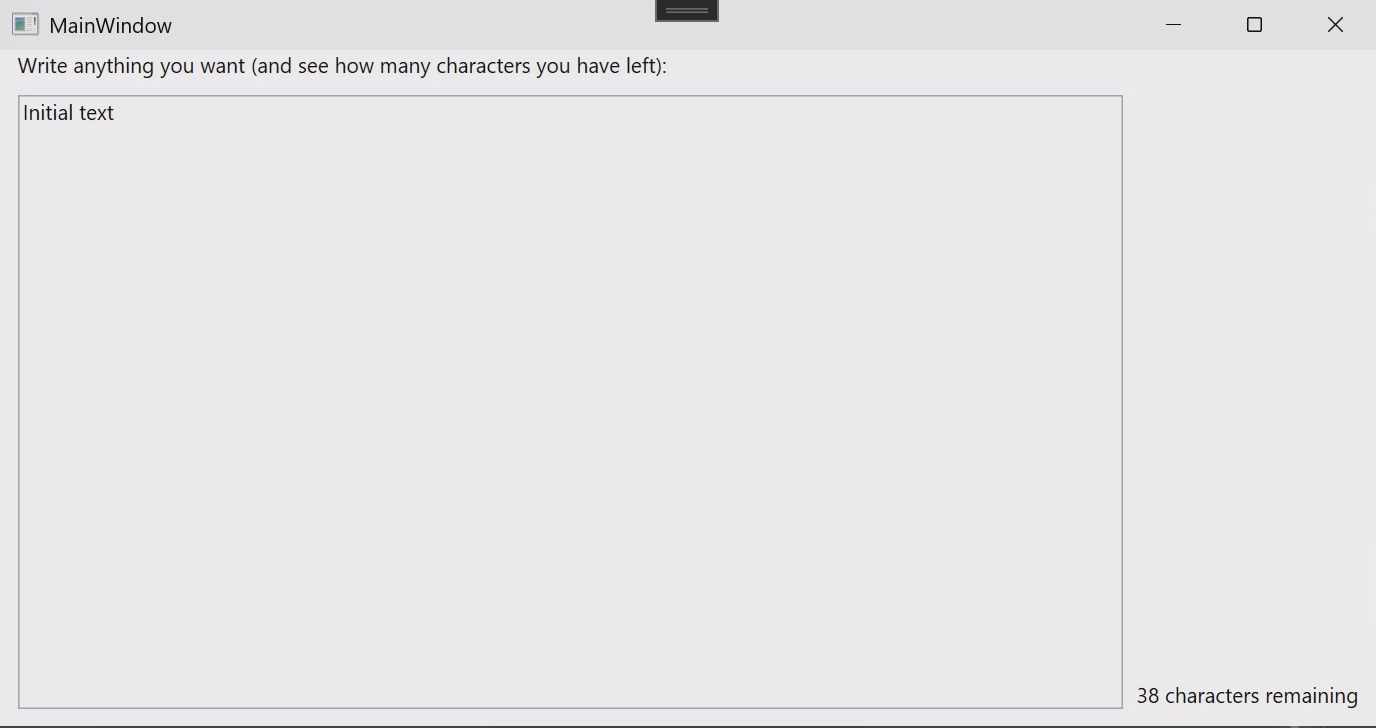
Here's how the dependency property `Text` is implemented and registered inside the `LimitedTextBox`:
```csharp
public static readonly DependencyProperty TextProperty = DependencyProperty.Register(
nameof(Text),
typeof(string),
typeof(LimitedTextBox),
new PropertyMetadata( string.Empty ) );
```
This code registers the dependency property using the `DependencyProperty.Register` method, which takes following parameters:
- The **property name** is just a string that matches the property's name in the class.
- The **property type** is the property type, in this case, an integer.
- The **owner type** is the class that owns the property.
- The [PropertyMetadata](https://learn.microsoft.com/en-us/dotnet/desktop/wpf/properties/dependency-property-metadata) parameter allows us, among other things, to specify the default value of the property. In this case, we set the default value to a default string
The code above is all you need for your property to work in XAML. If you want to easily set the property using C#, add the following code:
```csharp
public string Text
{
get => (string) this.GetValue( TextProperty );
set => this.SetValue( TextProperty, value );
}
```
The full source code of examples in this article is available on [GitHub](https://github.com/postsharp/TimelessDotNetEngineer/tree/main/src/wpf/dependencyproperties).
Registering the `MaxLength` property is similar.
Let us now see how the `Text` and `MaxLength` properties are used when the `LimitedTextBox` control is added to the main window:
```xml
```
In the XAML code snippet above, we set the `Test` property of the `LimitedTextBox` control to `50`, which sets the maximum length of the text that should be entered into the control. The same we explained before applies to the `Text` property, which is set to "Initial text". Note that the C# property setters are ignored when setting property values through XAML. You should consider the C# property as a wrapper around the dependency property, not the opposite.
## 2. Reacting upon property changes
We must implement a feature in our `LimitedTextBox` example: to modify, as the user is typing the text, the note informing of the number of remaining characters.
For this, we need to add a _property changed_ method. Let's call it `OnTextChanged`:
```csharp
private static void OnTextChanged(
DependencyObject d,
DependencyPropertyChangedEventArgs e )
{
var control = (LimitedTextBox) d;
control.UpdateRemainingCharsText( (string) e.NewValue );
}
private void UpdateRemainingCharsText( string updateTextValue )
{
var remainingChars = this.MaxLength - updateTextValue.Length;
this._remainingCharsTextBlock.Text = $"{remainingChars} characters remaining";
}
```
As you can see, this method casts the `DependencyObject` to a `LimitedTextBox` instance and call the `UpdateRemainingCharsText` method to update the text block with the remaining characters.
To register this method, we add a parameter to the `PropertyMetadata` object
```csharp
public static readonly DependencyProperty TextProperty = DependencyProperty.Register(
nameof(Text),
typeof(string),
typeof(LimitedTextBox),
new PropertyMetadata( string.Empty, OnTextChanged ) );
```
The `OnTextChanged` method is now called whenever the property value changes, allowing us to perform additional logic based on the new value.
## 3. Adding validation
Finally, let's see how we can validate that the `MaxLength` property is assigned a non-negative value.
First, we define a validation method:
```csharp
private static bool ValidateMaxLength( object value ) => value is > 0;
```
This method perform a simple validation check to ensure that the `MaxLength` property is a positive integer. If the value is valid, the method returns `true`; otherwise, it returns `false`.
Then, we register this callback by appending a paraneter to `DependencyProperty.Register`:
```csharp
public static readonly DependencyProperty MaxLengthProperty = DependencyProperty.Register(
nameof(MaxLength),
typeof(int),
typeof(LimitedTextBox),
new PropertyMetadata( 100 ),
ValidateMaxLength );
```
This validation callback is called before the property value is set, allowing us to enforce constraints on the property value.
We would like to enforce the `Text` property to have a value whose length is smaller or equal to `MaxLength`, but we cannot do that using this approach because the `ValidateValueCallback` delegate does not give us the object's instance. An alternative approach is to use pass a [CoerceValueCallback](https://learn.microsoft.com/en-us/dotnet/api/system.windows.coercevaluecallback) to the `PropertyMetalama` constructor.
## 4. Reducing boilerplate code
Implementing dependency properties manually involves a lot of boilerplate code and complexity. They make your code less readable and harder to maintain.
A few tools can simplify this process by automating boilerplate code generation and providing intuitive ways to handle common patterns in implementing dependency properties.
* [Metalama](https://www.postsharp.net/metalama) is an on-the-fly code generation and validation framework. It comes with a ready-made and well-tested `[DependencyProperty]` aspect that turns a C# automatic property into a WPF dependency property. Metalama's `[DependencyProperty]` aspect integrates with contracts such as `[NonNegative]` or `[NotEmpty]`, so it also eases the implementation of value validation.
* [DependencyPropertyGenerator](https://github.com/HavenDV/DependencyPropertyGenerator) is a Roslyn source generator that generates both the C# and the dependency property from type-level custom attributes. This approach is in our opinion non-idiomatic, potentially making the code _less_ readable.
Let's see what your code would look like with Metalama:
```csharp
[StrictlyGreaterThan( 0 )]
[DependencyProperty]
public int MaxLength { get; set; } = 100;
```
To read more about implementing dependency properties with Metalama, see [this blog post](https://postsharp.net/blog/wpf-dependency-property-metalama) or the [reference documentation](https://doc.postsharp.net/metalama/patterns/wpf/dependency-property).
## Summary
Dependency properties are a powerful tool for creating flexible, responsive, feature-rich, and highly reusable user controls in WPF. In fact, it's so important that whenever you build a user control, you should expose all its properties as dependency properties.
The downside of dependency properties is that it requires some boilerplate code to define the property and register the validation and change-processing logic, if any. Fortunately, tools like [Metalama](https://www.postsharp.net/metalama) can help [generate the boilerplate](https://postsharp.net/blog/wpf-dependency-property-metalama) for you, keeping your UI logic clean and succinct.
---
## Site navigation
- Index of the whole site: [llms.txt](../llms.txt)