[Home](../) › [Blog](../blog) › Query Any .NET Codebase from Your AI Agent with the Metalama MCP Server
# Query Any .NET Codebase from Your AI Agent with the Metalama MCP Server
> Metalama MCP is a new, free and open-source MCP server that lets AI coding agents explore any C# project or solution, with or without Metalama Framework, and browse the results in an interactive, LINQPad-style HTML view.
Published: 2026-11-19 · Author: Gaël Fraiteur · Canonical: https://postsharp.net/blog/metalama-mcp-server
Today we are releasing Metalama MCP, a new, free and open-source MCP server that lets your AI coding agent explore C# projects and solutions, whether or not they use Metalama Framework. The agent loads your solution once, then answers questions about types, members, inheritance and references by querying the compiler's semantic model, instead of grepping through dozens of files. When you want to see the results yourself, Metalama MCP opens them in an interactive HTML view, LINQPad style, where you can sort, filter and expand any declaration to browse the result set.
## Any .NET Project, With or Without Metalama
Every exchange below is a real session against [MediatR](https://github.com/jbogard/MediatR), a project that has never referenced Metalama. The first prompt loads it:
Load `src/MediatR/MediatR.csproj`.
`load_workspace`
MediatR is loaded: one project, built for `net6.0` and `netstandard2.0`, with no load errors.
The server loads `.csproj`, `.sln`, `.slnx` and `.slnf` files with MSBuild and Roslyn, and exposes them through the same code model that Metalama aspects and fabrics use. Your projects do not need to reference Metalama. Multi-targeted projects load once per target framework, so the agent can tell you what differs between them. When your projects do use Metalama, the agent sees more: the aspect instances, the advice, and the *transformed* code that the aspects produce.
## Asking Questions About the Code
The server exposes five tools: `load_workspace`, `reload_workspace`, `unload_workspace`, `query` and `open`. A query is a C# expression, or a block of statements ending with `return`, written against the same API as our [LINQPad driver](https://doc.postsharp.net/metalama/preview/conceptual/introspection/linqpad). You do not write the queries yourself: you ask in plain English, and the agent writes them.
### Which classes implement an interface?
Which types in MediatR implement `IPipelineBehavior`?
`query`
```csharp
workspace.GetProject( "MediatR", "net6.0" ).SourceCode.Types
.Where( t => t.AllImplementedInterfaces.Any( i => i.Name == "IPipelineBehavior" ) )
```
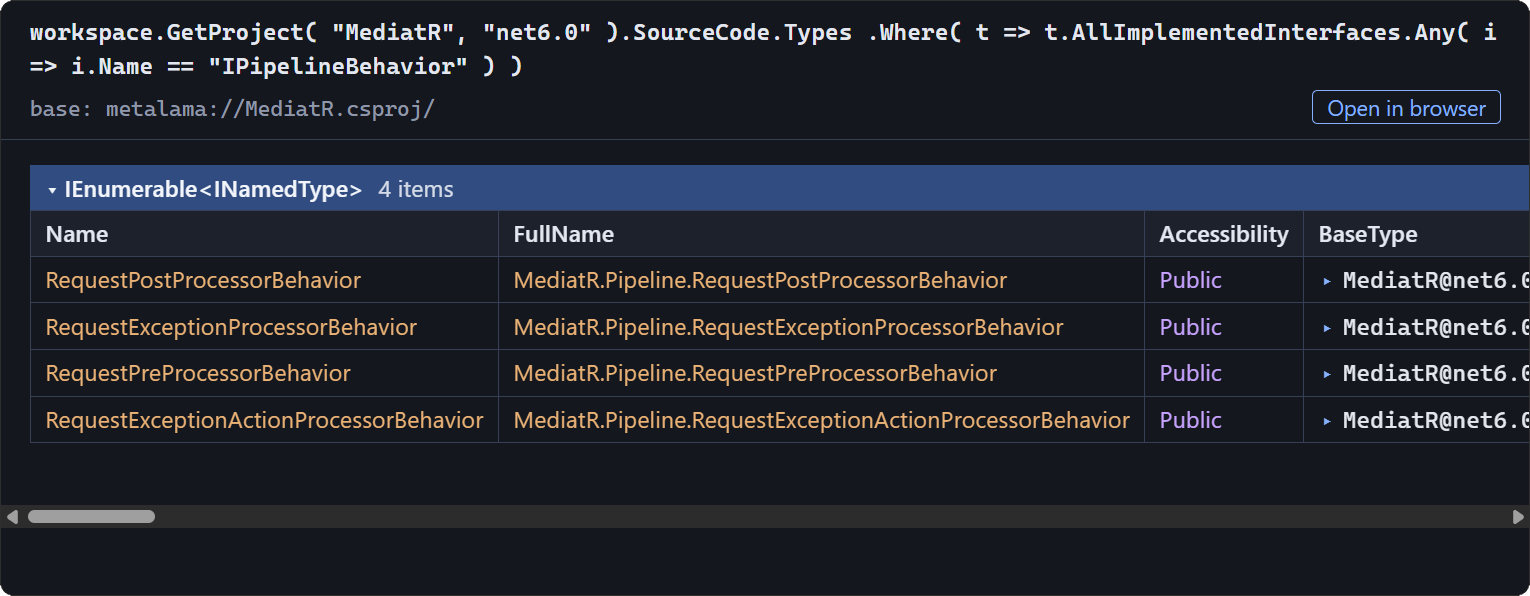
Four types implement `IPipelineBehavior`, all in `MediatR.Pipeline`: the pre-processor, post-processor, exception-processor and exception-action-processor behaviors.
`AllImplementedInterfaces` includes the interfaces inherited from base types, which no text search can give you. Behind the widget, the agent receives each declaration with a *link* it can pass back to the `open` tool to drill down, and a `file:line` location it can read with its own file tools.
### Who uses this type?
Where is `IMediator` used, and how?
`query`
```csharp
D( "T:MediatR.IMediator", project: "MediatR", tfm: "net6.0" )
.GetInboundReferences()
.Select( r => new { r.OriginDeclaration, r.Kinds } )
```
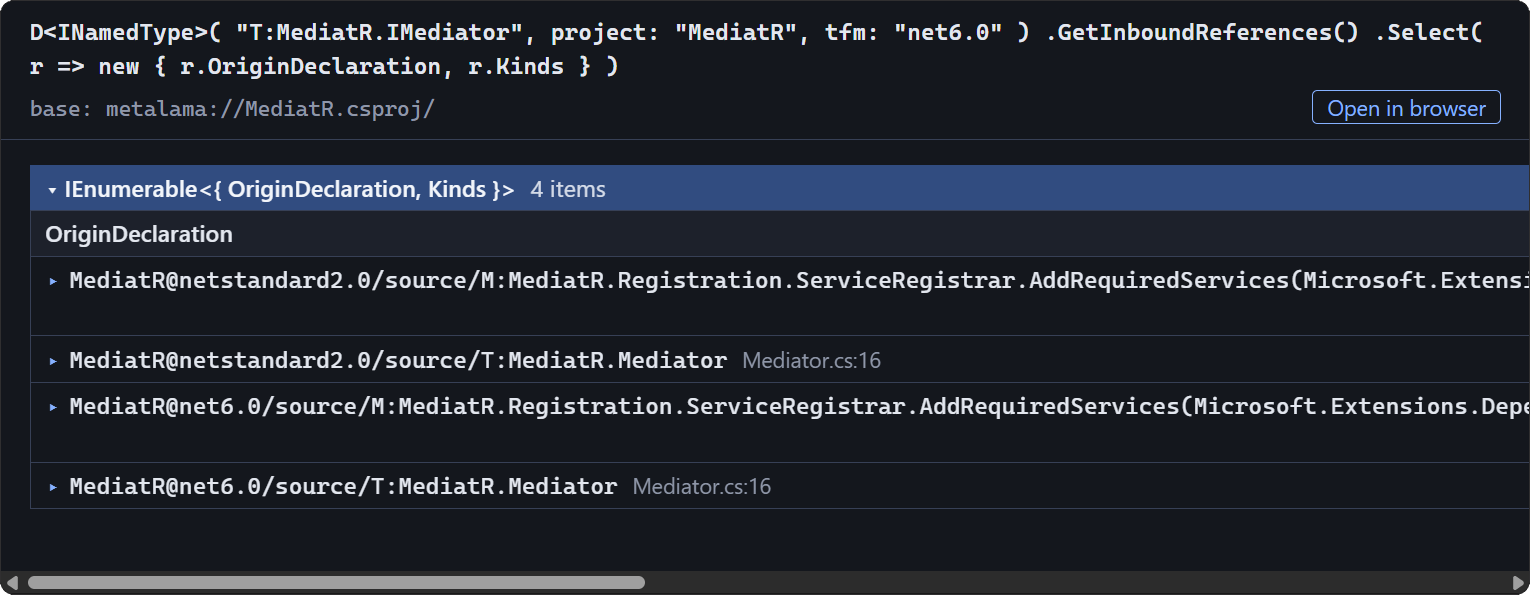
`IMediator` is used in two places, in both target frameworks: `Mediator` implements it, and `ServiceRegistrar.AddRequiredServices` registers it in the service collection, with `typeof(IMediator)` and as the type argument of `GetRequiredService()`.
The references come with their *kind*, so the agent tells an implementation from a registration without opening the files. `GetOutboundReferences()` answers the reverse question, and `GetDerivedTypes()` walks the inheritance tree.
### Where is the complexity?
Which five types have the most methods? Give me their method and property counts.
`query`
```csharp
workspace.GetProject( "MediatR", "net6.0" ).SourceCode.Types
.OrderByDescending( t => t.Methods.Count )
.Select( t => new { Type = t, Methods = t.Methods.Count, Properties = t.Properties.Count } )
.Take( 5 )
```
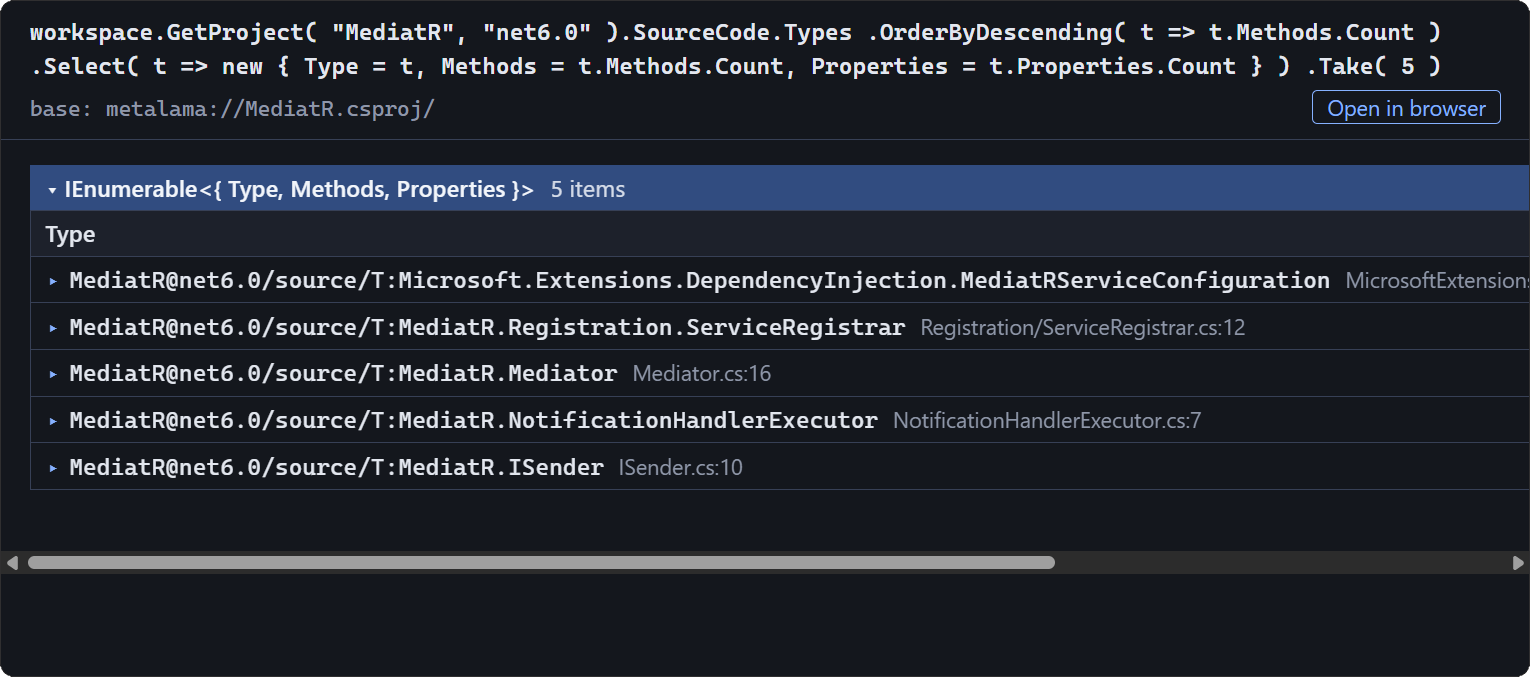
`MediatRServiceConfiguration` leads with 26 methods and 17 properties, ahead of `ServiceRegistrar` with 19 methods. No other type has more than 9 methods.
The workspace was loaded once, so follow-up queries take milliseconds. Projections to anonymous types render as tables, and declarations keep their links.
## The Interactive HTML View
Text output is for the agent. For you, there is a browser view:
Show me this list in my browser.
`query` with `format: html`
Here it is: `https://localhost:53271/…/r/HuYiYdCC7GdXNPhW`. The link works as long as the MCP server is running.
The page works much like LINQPad:
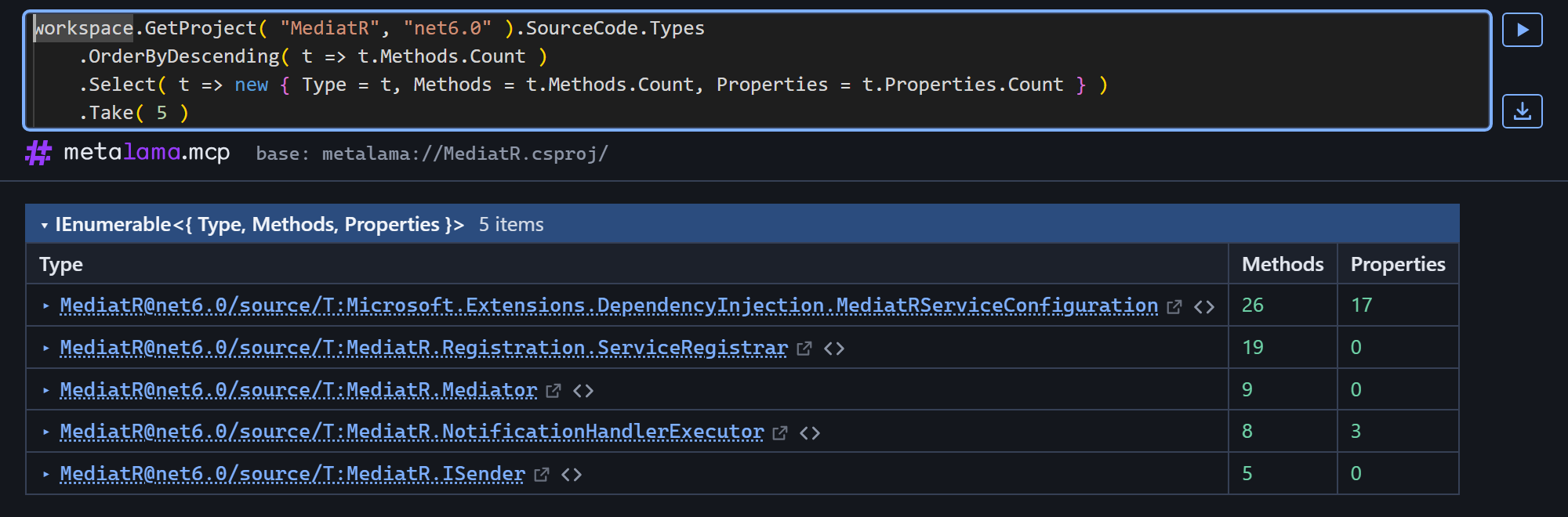
- **Sort and filter.** Click a column header to sort; the **Filter** box keeps the rows that contain a text.
- **Expand on demand.** Click a declaration to expand its properties in place. Values are loaded from the server as you click, so you can walk from a type to its methods, to their parameters, to their references.
- **Jump to the source.** One icon opens the declaration on its own page, the other opens the source file at the right line in your editor.
- **Hand back to the agent.** The **link** button copies the link the agent accepts, and the **C#** button copies a C# expression that resolves the declaration in a query.
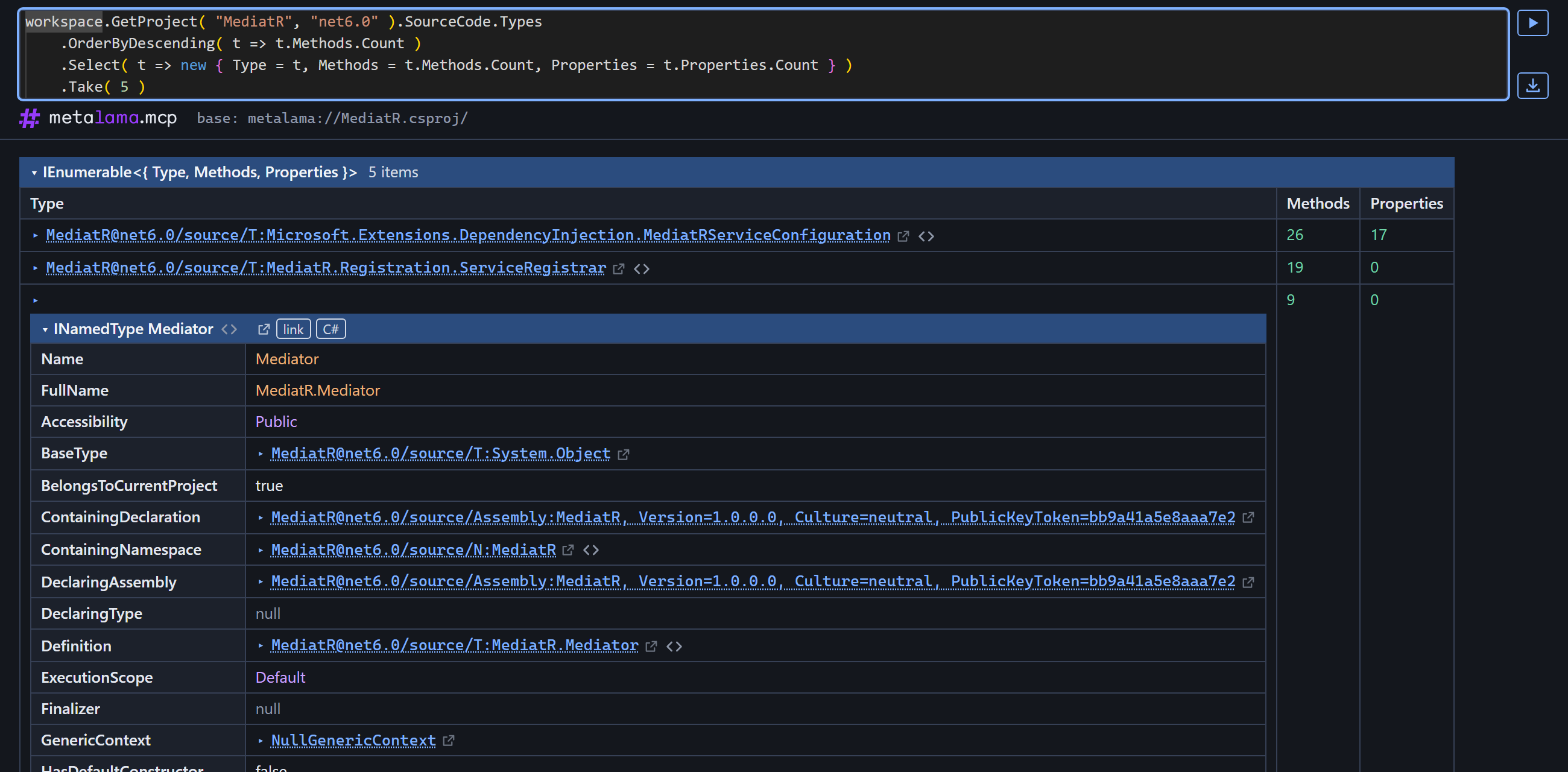
The query at the top of the page is editable. It has completion, tooltips, parameter hints and error underlines, and **Ctrl+Enter** runs it again. The agent writes the first draft of the query; you refine it yourself.
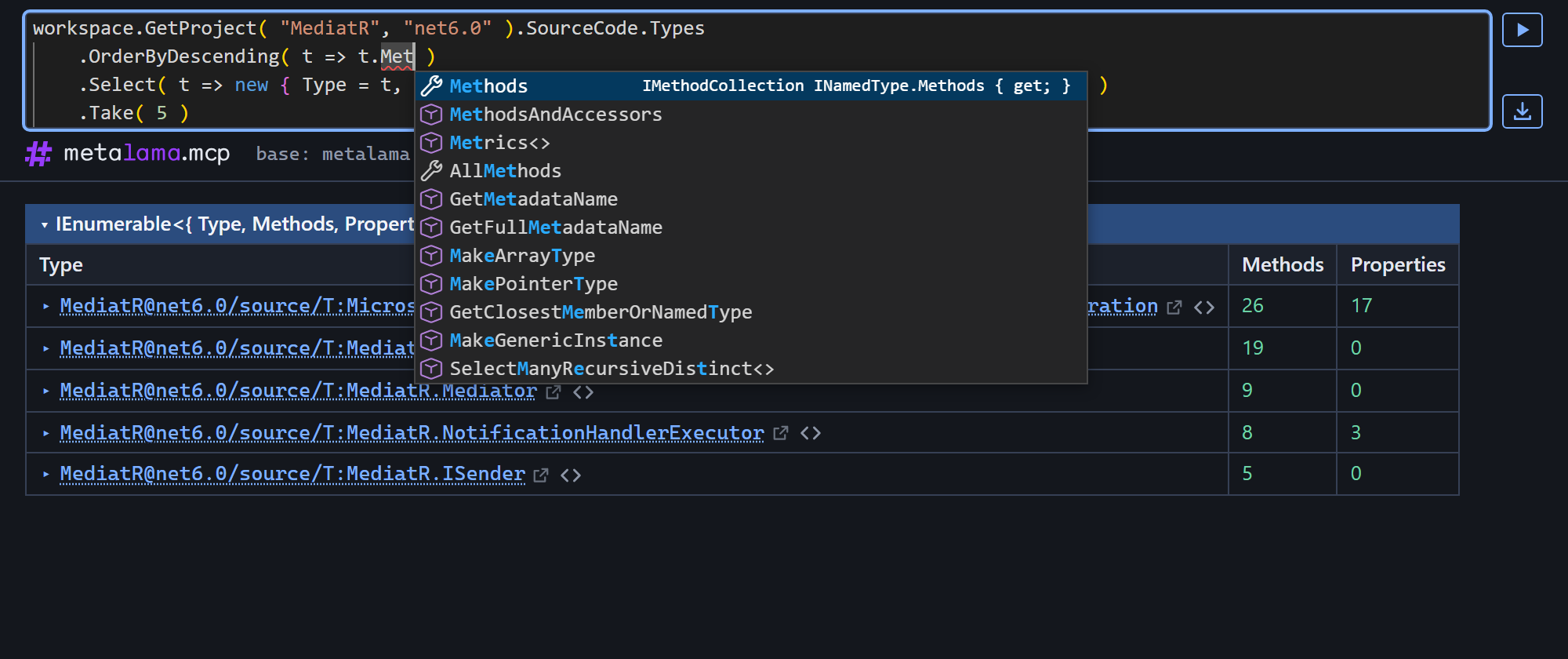
A download button saves a snapshot of the page that works without the server.
Agents that support MCP Apps, such as Claude, show results inline in the conversation, as in the replies above. Once a result has been shown in the browser, the widget gets an **Open in browser** button that takes you to the full page.
## Inspecting the Aspects of a Metalama Project
When a project uses Metalama Framework, the agent also sees its aspects: which ones are applied, where, and what they changed. Our own example is the web application behind our store and customer portal. Its nine projects use [Metalama Patterns](https://doc.postsharp.net/metalama/preview/patterns) for caching and contracts, plus three aspects of our own.
### Which aspects are used?
Load our web application and tell me which aspects it uses, and how often.
`load_workspace`
`query`
```csharp
workspace.AspectClasses
.Where( c => c.Instances.Any() && !c.FullName.StartsWith( "Metalama.Framework" ) )
.OrderByDescending( c => c.Instances.Count() )
.Select( c => new { Aspect = c, Instances = c.Instances.Count() } )
```
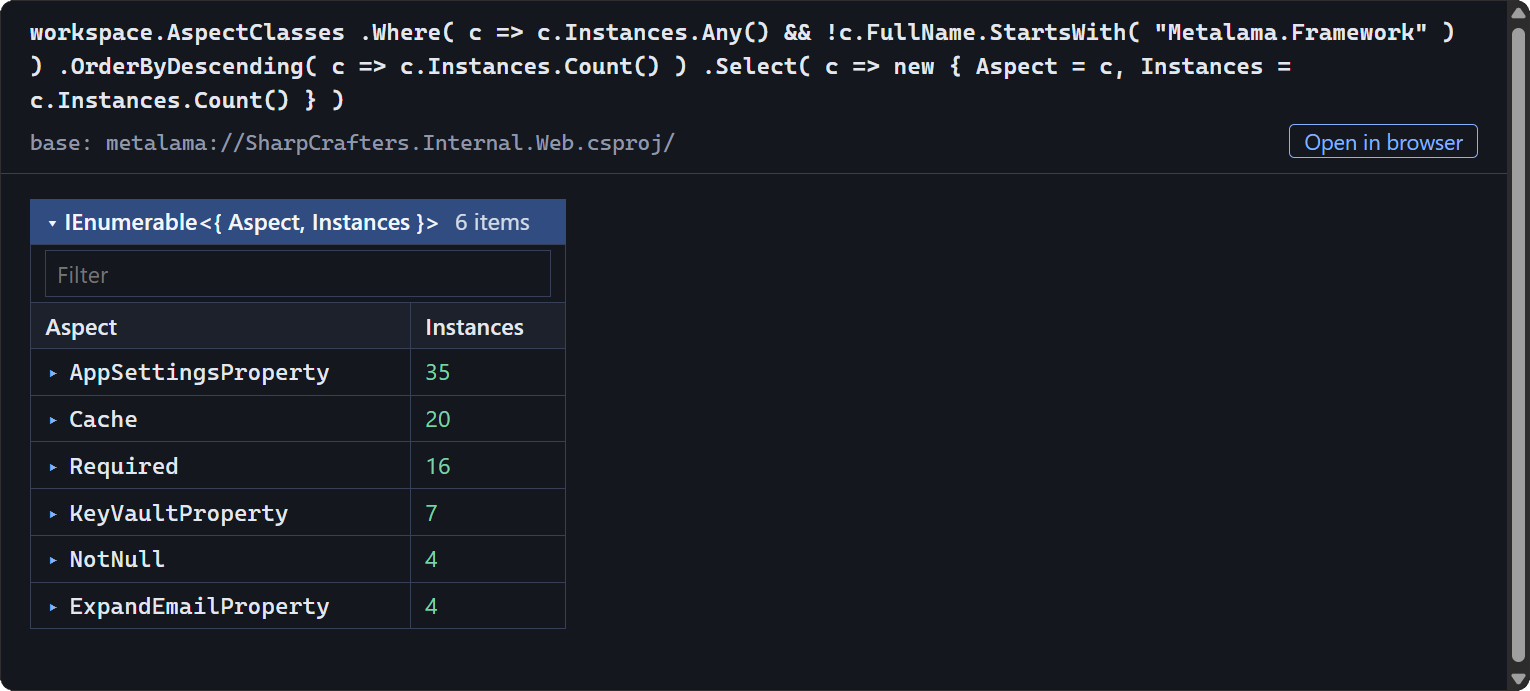
Six aspects, applied 86 times. Three are your own: `[AppSettingsProperty]` (35), `[KeyVaultProperty]` (7) and `[ExpandEmailProperty]` (4) bind properties to application settings, Key Vault secrets and e-mail placeholders. The other three come from Metalama Patterns: `[Cache]` (20), and the `[Required]` (16) and `[NotNull]` (4) contracts.
The filter on `Metalama.Framework` leaves out the aspects that Metalama creates for its own needs.
### Where is this aspect used?
Where is `[Cache]` used?
`query`
```csharp
workspace.AspectInstances
.Where( a => a.AspectClass.ShortName == "Cache" )
.Select( a => a.TargetDeclaration )
```
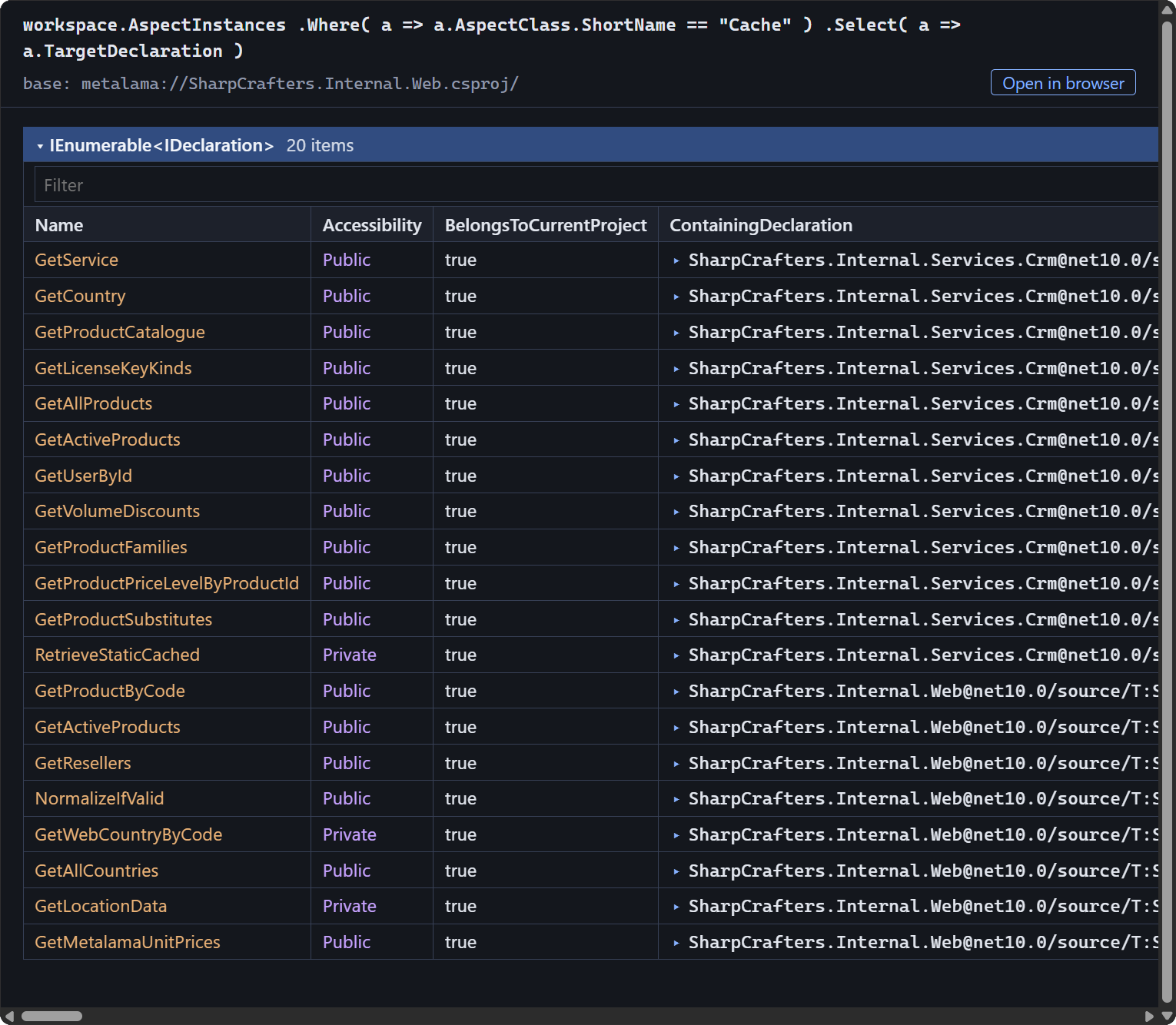
On 20 methods. 12 are in `CrmFacade`, which caches the CRM lookups: products, prices, discounts, countries and users. The other 8 are in the web application itself: the product and account services, the GeoIP and VAT lookups, the country list, and the Metalama unit prices.
Each aspect instance also knows what created it, the advice it added, and the code it produced: the agent can follow it into `TransformedCode` to show you a method as it compiles, with the caching in place.
## What the Agent Can Query
The `workspace` object exposes:
- **Source code:** `SourceCode.Types`, `Methods`, `Fields`, `Properties`, `Constructors`, `Events`, across all projects and target frameworks.
- **References:** `GetInboundReferences()`, `GetOutboundReferences()` and `GetDerivedTypes()`.
- **Diagnostics:** the compiler warnings and errors, and the load issues of the workspace.
- **Metrics:** from `Metalama.Extensions.Metrics`, such as the number of syntax nodes of a method.
- **For Metalama projects:** `TransformedCode`, `AspectClasses`, `AspectInstances`, `Advice` and `Transformations`.
The agent finds its way through this object model on its own, but you can read it too: see the [Introspection API reference](https://doc.postsharp.net/metalama/preview/api/introspection-api).
## Getting Started
The server is the `metalama-mcp` .NET tool. It requires the .NET 10 SDK or later.
```powershell
dotnet tool install -g Metalama.Mcp
```
With Claude Code:
```powershell
claude mcp add metalama -- metalama-mcp
```
Other agents, such as GitHub Copilot and Cursor, take the same command in their MCP configuration. Start the agent from your repository directory, because the server resolves relative paths against its working directory. For the browser view, trust the .NET development certificate once:
```powershell
dotnet dev-certs https --trust
```
The MCP server is part of Metalama 2027.0, currently in preview. See [Using the MCP server](https://doc.postsharp.net/metalama/preview/conceptual/introspection/mcp-server) for the details.
---
## Site navigation
- Index of the whole site: [llms.txt](../llms.txt)