[Home](../) › [Blog](../blog) › 4 Ways to Implement INotifyPropertyChanged
# 4 Ways to Implement INotifyPropertyChanged
> Explore various methods to implement the INotifyPropertyChanged interface efficiently with minimal manual coding.
Published: 2024-10-24 · Author: Metalama Team · Canonical: https://postsharp.net/blog/inotifypropertychanged
In .NET desktop and mobile, the `INotifyPropertyChanged` interface is typically implemented by data objects (i.e., the _model_ layer) to notify the _view_ layer when something changes and the UI needs updating. Implementing this interface is straightforward for trivial cases like automatic properties, but it becomes more complex for computed properties or those that depend on other objects. In this article, we'll explore several implementation strategies and tools to simplify the implementation of `INotifyPropertyChanged`.
## What is INotifyPropertyChanged?
The `INotifyPropertyChanged` interface is part of the .NET framework, primarily used in data binding scenarios. Its main role is to provide a standardized way for objects to notify subscribers, such as UI elements, when a property's value changes. The interface defines a single event, `PropertyChanged`, which is triggered whenever a property's value is updated. By implementing this interface in your classes and raising the `PropertyChanged` event in property setters, you can effectively inform any subscribers about these changes.
This mechanism is particularly vital when using the **Model-View-ViewModel (MVVM)** design pattern, which is widely used in **Windows Presentation Foundation (WPF)** applications.
## Why INotifyPropertyChanged is Useful
The `INotifyPropertyChanged` interface plays a crucial role in data-driven and interactive applications by enabling real-time updates to the user interface. Within the MVVM framework, it ensures that changes in the ViewModel's properties are automatically reflected in the View. This automatic synchronization removes the need for manual UI updates whenever underlying data changes, reducing both complexity and the likelihood of errors.
Consider an app that calculates the area of a rectangle based on its width and height. When the user enters new values for the width or height, the area should be recalculated and displayed immediately. This is where `INotifyPropertyChanged` comes into play, ensuring that the UI is updated whenever the `Width` or `Height` properties change.
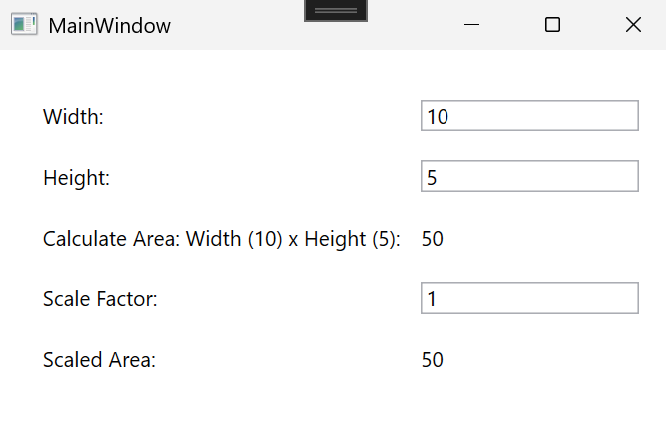
Beyond UI scenarios, `INotifyPropertyChanged` is valuable in contexts where objects need to respond to property changes, such as event-driven programming or data synchronization tasks. It facilitates the creation of a loosely coupled, responsive system where components can react to state changes without directly monitoring or modifying the objects.
## How to Use INotifyPropertyChanged in C#?
### 1. From Code
To react to property changes in code, you can subscribe to the `PropertyChanged` event of an object that implements `INotifyPropertyChanged`. Here's an example:
```cs
rectangle.PropertyChanged += (_, args) => Console.WriteLine($"Property {args.PropertyName} has changed.");
```
In this example, whenever a property of the `rectangle` object changes, a message will be printed to the console indicating which property has changed.
### 2. From XAML, Using a Binding
In XAML-based applications like WPF or UWP, you can bind UI elements to properties of objects that implement `INotifyPropertyChanged`. This allows the UI to automatically update when the underlying property values change. Here's a basic example:
```xml
```
In this case, if the data context implements `INotifyPropertyChanged` and the `Width` property changes, the text displayed by the `TextBlock` will automatically update.
These approaches help to keep the user interface and data models efficiently synchronized without the need for manual updates for each change.
## How to implement INotifyPropertyChanged?
You have different options:
1. [Manually](#approach1)
2. [Metalama](#approach2)
3. [MVVM Community Toolkit](#approach3)
4. [Fody.NotifyPropertyChanged](#approach4)
## Approach 1. Write the code manually
To implement `INotifyPropertyChanged` manually, you’ll need to:
- Use the `System.ComponentModel` namespace.
- Define the `PropertyChanged` event within your class.
- Create a protected method `OnPropertyChanged` to trigger the `PropertyChanged` event with a string parameter for the changed property's name (optional but highly recommended).
- Edit all methods or property setters that modify the state of your object and call the `OnPropertyChanged` method.
Let’s set up the infrastructure for our example `Rectangle` class of the area calculator.
```cs
public class Rectangle : INotifyPropertyChanged
{
//...
public event PropertyChangedEventHandler PropertyChanged;
protected void OnPropertyChanged([CallerMemberName] string? propertyName = null)
{
PropertyChanged?.Invoke(this, new PropertyChangedEventArgs(propertyName));
}
}
```
With the event and method set up, we now need to make sure the property setters call the `OnPropertyChanged` method to notify the changes. In this article, we'll cover 4 different scenarios depending on how the property is implemented:
1. [Simple, automatic properties](#scenario1)
2. [Computed properties, dependent on other fields or properties](#scenario2)
3. [Properties depending on other objects](#scenario3)
4. [Properties depending on properties of the base class](#scenario4)
### 1. Simple properties
Let's say we want to add `Width` and `Height` properties to our `Rectangle` class. In the setter of each property, we should check if the new value differs from the current one to prevent unnecessary notifications. If it does, update the backing field and invoke `OnPropertyChanged`, passing the property's name. This ensures that any bound UI elements will be updated immediately when any change occurs. Here's how it looks in code:
```cs
private double _width;
public double Width
{
get => _width;
set
{
if (_width != value)
{
_width = value;
OnPropertyChanged(nameof(this.Width));
}
}
}
// Same pattern for the Height property
```
You can even simplify this code a bit by creating a helper method that encapsulates the property change logic. Here's an example of how you can refactor the `Rectangle` property using this helper method:
```cs
protected void ChangeProperty(ref T field, T value, [CallerMemberName] string? propertyName = null)
{
if (field != value)
{
field = value;
OnPropertyChanged(propertyName);
}
}
private double _width;
public double Width
{
get => _width;
set => ChangeProperty(ref _width, value);
}
```
However, this simple scenario, with or without the helper, can quickly become cumbersome in real-world cases as we will see in the next sections.
So far, things look quite simple. However, it gets more complex once we add more advanced properties to our object.
### 2. Computed properties
To illustrate this new scenario, let's add to our basic `Rectangle` class, an `Area` property that depends on `Width` and `Height`.
```csharp
public double Area => this.Height * this.Width;
public double ScaledArea => this.Area * this.ScaleFactor;
```
When properties are dependent on other properties, you have to ensure that all related properties are notified to the user interface. In this case, every time the `Width` or `Height` property changes, we must notify the user interface that the `Area` property has also changed. Here's how you can do this in code:
```csharp
private double _width;
public double Width
{
get
{
return this._width;
}
set
{
if ( this._width != value )
{
this._width = value;
this.OnPropertyChanged( nameof(this.Width) );
this.OnPropertyChanged( nameof(this.Area) );
this.OnPropertyChanged( nameof(this.ScaledArea) );
}
}
}
```
Here, the `Width` setter not only raises the `PropertyChanged` event for `Width` but also for `Area` due to their dependency. As you can imagine, this manual process can easily (and quickly) become difficult to maintain as we define more dependent properties like in this case the `ScaledArea`.
### 3. Properties depending on child objects
An example of this type of property occurs when we add an `Area` property to a `RectangleCalcViewModel` class that depends on a `Rectangle` property. In this case, the `Area` property in the `Rectangle` instance that calculates the area of the rectangle is accessed through the `Area` property of the `RectangleCalcViewModel`.
```csharp
public double Area => this.Rectangle.Area;
```
In this scenario, the `INotifyPropertyChanged` interface does not automatically manage changes in properties within child objects. When a child property's value changes (e.g., `Width` in the `Rectangle` instance), the parent object (`RectangleCalcViewModel`) does not receive a notification that the `Area` property of the `Rectangle` object changed, which prevents the UI from updating as expected.
Developers need to implement additional logic to propagate these changes, which increases complexity and the potential for errors.
```csharp
private Rectangle _rectangle = new( 10, 5 );
public Rectangle Rectangle
{
get => this._rectangle;
set
{
if ( !ReferenceEquals( value, this._rectangle ) )
{
this.UnsubscribeFromRectangle();
this._rectangle = value;
this.OnPropertyChanged( nameof(this.Rectangle) );
this.SubscribeToRectangle( this.Rectangle );
}
}
}
public double Area => this.Rectangle.Area;
private void SubscribeToRectangle( Rectangle value )
{
if ( value != null )
{
value.PropertyChanged += this.HandleRectanglePropertyChanged;
}
}
private void HandleRectanglePropertyChanged( object? sender, PropertyChangedEventArgs e )
{
{
var propertyName = e.PropertyName;
if ( propertyName is null or nameof(this.Rectangle.Width)
or nameof(this.Rectangle.Height) )
{
this.OnPropertyChanged( nameof(this.Area) );
}
}
}
private void UnsubscribeFromRectangle()
{
if ( this._rectangle != null! )
{
this._rectangle.PropertyChanged -= this.HandleRectanglePropertyChanged;
}
}
```
In this example, the `RectangleCalcViewModel` subscribes to the `PropertyChanged` event of the `Rectangle` object. This ensures that changes to `Width` or `Height` trigger a `PropertyChanged` event for the `Area` property in the ViewModel. Managing such subscriptions manually is tedious, especially when dealing with multiple child objects or more complex dependencies.
### 4. Properties depending on properties of the base class
For this last case, let's create a superclass `Polygon` with a `ScaleFactor` property, and make `Rectangle` a subclass of `Polygon`. Then, add a `ScaledArea` property to the `Rectangle` class that returns the `Area` value multiplied by the `ScaleFactor` of the parent class. Thus, the `ScaledArea` property will depend on the `Area` and `ScaleFactor` properties.
```csharp
internal partial class Polygon : INotifyPropertyChanged
{
private double _scaleFactor = 1;
// This attribute represents a multiplier for dimensions
public double ScaleFactor
{
get
{
return this._scaleFactor;
}
set
{
if ( this._scaleFactor != value )
{
this._scaleFactor = value;
this.OnPropertyChanged( nameof(this.ScaleFactor) );
}
}
}
protected virtual void OnPropertyChanged( string propertyName )
{
this.PropertyChanged?.Invoke( this, new PropertyChangedEventArgs( propertyName ) );
}
public event PropertyChangedEventHandler? PropertyChanged;
}
```
When properties depend on those from a base class, developers must ensure changes in base class properties propagate to derived class properties, leading to more boilerplate code. Let's see how to tackle this in the `Rectangle` class:
```csharp
public double ScaledArea => this.Area * this.ScaleFactor;
protected override void OnPropertyChanged( string propertyName )
{
switch ( propertyName )
{
case nameof(this.ScaleFactor):
this.OnPropertyChanged( nameof(this.ScaledArea) );
break;
}
base.OnPropertyChanged( propertyName );
}
```
In this example, the `Rectangle` class overrides the `OnPropertyChanged` method to raise a `PropertyChanged` event for `ScaledArea` whenever `ScaleFactor` changes. This manual propagation is error-prone and challenging to maintain, especially with multiple derived classes and intricate property dependencies.
### Limitations of the manual approach
While implementing `INotifyPropertyChanged` manually is a viable option, it has several limitations:
1. **Boilerplate code**
- Repetitive code can clutter meaningful business code, making it difficult to read and understand.
- Increases the likelihood of errors due to oversight.
- Risk of forgetting to call `OnPropertyChanged` in a property setter.
- Possibility of missing a dependency.
2. **Scalability**
- As the number of properties and dependencies grows, manual implementation becomes increasingly complex.
- More challenging to maintain with increased complexity.
- Error-prone nature of manual event raising.
- Missing an update can lead to incorrect application behavior that's hard to track through testing or debugging.
As an example of both limitations, see the amount of code needed to implement the `INotifyPropertyChanged` interface in the `Rectangle` class. This code is repetitive and error-prone, especially when dealing with multiple properties and dependencies.
```csharp
internal partial class Rectangle : Polygon
{
private double _width;
public double Width
{
get
{
return this._width;
}
set
{
if ( this._width != value )
{
this._width = value;
this.OnPropertyChanged( nameof(this.Width) );
this.OnPropertyChanged( nameof(this.Area) );
this.OnPropertyChanged( nameof(this.ScaledArea) );
}
}
}
private double _height;
public double Height
{
get
{
return this._height;
}
set
{
if ( this._height != value )
{
this._height = value;
this.OnPropertyChanged( nameof(this.Height) );
this.OnPropertyChanged( nameof(this.Area) );
this.OnPropertyChanged( nameof(this.ScaledArea) );
}
}
}
public double Area => this.Height * this.Width;
public double ScaledArea => this.Area * this.ScaleFactor;
protected override void OnPropertyChanged( string propertyName )
{
switch ( propertyName )
{
case nameof(this.ScaleFactor):
this.OnPropertyChanged( nameof(this.ScaledArea) );
break;
}
base.OnPropertyChanged( propertyName );
}
public Rectangle( double width, double height )
{
this.Width = width;
this.Height = height;
}
}
```
Think about adding more complex properties like `Perimeter`, `Diagonal`, etc., and how quickly those new properties would muddy up the `Width` and `Height` properties.
## Approach 2. Metalama
As stated in the previous section, manually implementing `INotifyPropertyChanged` can be error-prone and burdensome. In such scenarios, Metalama can be highly beneficial. [Metalama](https://www.postsharp.net/metalama) is a tool that allows you to automate repetitive tasks in your codebase using aspects, special custom attributes that execute within the compiler or the IDE and dynamically transform your source code.
You can proceed directly to our article on [how to implement INotifyPropertyChanged without boilerplate code using Metalama](https://postsharp.net/blog/inotifypropertychanged-metalama). However, if you'd like a brief overview here, let me guide you through it, because there are multiple ways to implement `INotifyPropertyChanged` with Metalama.
The most practical method is by utilizing the `Observable` pattern, which is one of the [many](https://www.postsharp.net/metalama/marketplace) open-source, production-ready aspects provided by Metalama. This pattern is designed to automatically identify properties dependent on others and send out change notifications for them. This means you don't have to manually trigger the `PropertyChanged` event for these dependent properties, child objects, or any other previous cases because the aspect manages that for you.
Let me demonstrate it using the same `Rectangle` class we used earlier, but now employing the `Observable` pattern:
```csharp
[Observable]
internal partial class Rectangle : Polygon
{
public Rectangle( double width, double height )
{
this.Width = width;
this.Height = height;
}
public double Width { get; set; }
public double Height { get; set; }
public double Area => this.Height * this.Width;
public double ScaledArea => this.Area * this.ScaleFactor;
}
```
And that's it. See how we can still use our beloved automatic properties without having to deal with complex and repetitive code? You might be wondering, "Okay, but what about the dependencies of derived classes? How is the `ScaleFactor` handled?" Well, the `Observable` pattern also manages that for you.
```csharp
[Observable]
internal partial class Polygon
{
// This attribute represents a multiplier for dimensions
public double ScaleFactor { get; set; } = 1;
}
```
The same applies to the `RectangleCalcViewModel`. You can observe how the `Observable` pattern handles dependencies of child objects like the `Rectangle` property in this instance.
```csharp
[Observable]
internal partial class RectangleCalcViewModel
{
public Rectangle Rectangle { get; set; } = new( 10, 5 );
public double Area => this.Rectangle.Area;
}
```
And while it may seem like magic, it’s not. It’s simply Metalama doing its job. Behind the scenes, Metalama analyzes your code to track all managed relationships between properties. Then, it dynamically generates the necessary code to implement the `INotifyPropertyChanged` interface for you. This way, you can concentrate on what truly matters: your business logic.
Okay, so you don't take one person's word for it and prefer to get different perspectives? Let's analyze other tools you can use to reduce the boilerplate code when implementing `INotifyPropertyChanged`, although they may not overcome all the issues we've discussed.
## Approach 3. CommunityToolkit.Mvvm
The CommunityToolkit.Mvvm package is a contemporary, efficient, and modular MVVM library maintained and released by Microsoft. It is part of the [.NET Community Toolkit](https://github.com/CommunityToolkit/dotnet) and offers a collection of essential classes, utilities, and helpers aimed at simplifying the implementation of the **Model-View-ViewModel (MVVM)** architectural pattern in .NET applications.
The CommunityToolkit.Mvvm library includes a class called `ObservableObject` which is responsible for the automatic implementation of the `INotifyPropertyChanged` interface. It also includes the `ObservableProperty` attribute, which converts annotated fields into properties that emit `PropertyChanged` events when their values change.
Now, let's examine how the `Rectangle` class would look using the `ObservableProperty` attribute:
```csharp
internal partial class Rectangle : Polygon // Polygon inherits from ObservableObject
{
public Rectangle( double width, double height )
{
this.width = width;
this.height = height;
}
[ObservableProperty]
[NotifyPropertyChangedFor( nameof(Area) )]
[NotifyPropertyChangedFor( nameof(ScaledArea) )]
public double width;
[ObservableProperty]
[NotifyPropertyChangedFor( nameof(Area) )]
[NotifyPropertyChangedFor( nameof(ScaledArea) )]
public double height;
public double Area => this.Height * this.Width;
public double ScaledArea => this.Area * this.ScaleFactor;
}
```
As you can observe, the `ObservableProperty` attribute is applied to the `width` and `height` fields, while the `Rectangle` class derives from the `ObservableObject` base class (via the `Polygon` class). This basic setup automatically generates the necessary code to trigger the `PropertyChanged` event when either the `width` or `height` properties change.
It is important to note that the `ObservableProperty` is applied to fields rather than properties. This is because it generates a corresponding property by converting its name into UpperCamelCase, adhering to proper .NET naming conventions. Consequently, the `width` field becomes a `Width` property, and similarly for height. You can create properties that rely on other fields or properties by using the `NotifyPropertyChangedFor` attribute. This attribute specifies which dependent properties should automatically raise the `PropertyChanged` event whenever the related fields or properties change.
### Limitations of the CommunityToolkit.Mvvm approach
Compared with traditional implementations of `INotifyPropertyChanged`, using the `ObservableProperty` attribute reduces repetitive code needed to trigger the `PropertyChanged` event for each property. However, it has some limitations:
* Manual intervention is still needed to specify dependent properties, so there remains a risk of forgetting to add an attribute or missing a dependency.
* Dependencies on child objects are not supported.
Nevertheless, if you seek a straightforward and lightweight solution for minimizing repetitive code when implementing `INotifyPropertyChanged`, then utilizing `ObservableProperty` from the CommunityToolkit.Mvvm library is an excellent choice.
## Approach 4. Fody.PropertyChanged
Fody is a popular code weaving tool that simplifies the implementation of repetitive tasks in .NET applications. One of the plugins available for Fody is `PropertyChanged`, which automatically implements the `INotifyPropertyChanged` interface for classes and properties. This plugin is particularly useful for reducing boilerplate code and ensuring that property changes are automatically propagated to subscribers.
Let's see how our `Rectangle` class would look using the `Fody.PropertyChanged` plugin:
```csharp
internal partial class Rectangle : Polygon
{
public Rectangle( double width, double height )
{
this.Width = width;
this.Height = height;
}
public double Width { get; set; }
public double Height { get; set; }
public double Area => this.Height * this.Width;
public double ScaledArea => this.Area * this.ScaleFactor;
}
```
But wait, where is the `INotifyPropertyChanged` interface implementation? Remember, our `Rectangle` class inherits from `Polygon`. Let's check there.
```csharp
internal partial class Polygon : INotifyPropertyChanged
{
public event PropertyChangedEventHandler PropertyChanged;
// This attribute represents a multiplier for dimensions
public double ScaleFactor { get; set; } = 1;
}
```
Okay, now we see how the `Fody.PropertyChanged` plugin works. You just need to implement the `INotifyPropertyChanged` interface in the class, and the plugin will take care of the rest. The `Fody.PropertyChanged` plugin automatically generates the necessary code to raise the `PropertyChanged` event when a property changes, eliminating the need for manual implementation in each property setter.
Again, compared with traditional implementations of `INotifyPropertyChanged`, using the `Fody.PropertyChanged` plugin significantly reduces boilerplate code and simplifies the implementation of `INotifyPropertyChanged`. It also supports the use of properties depending on properties of the base class (our calculated `ScaledArea` property).
### Limitations of the Fody.PropertyChanged Approach
While the `Fody.PropertyChanged` plugin is a powerful tool for automating the implementation of `INotifyPropertyChanged`, it has some limitations:
* Dependencies on child objects (the scenario #3 reviewed earlier) are not supported.
## Comparison
As a summary, let's compare the different approaches we went through in this article:
| Criteria | Metalama | MVVM Community Toolkit | Fody |
|------------------------------------------|-----------|-----------------------------------|---------------|
| Field Backed Properties | Supported | Supported (generated from fields) | Supported |
| Automatic Properties | Supported | Supported (generated from fields) | Supported |
| Complex Properties (Dependent on Others) | Supported | Supported, requires manual code | Supported |
|------------------------------------------|-----------|---------------------------------|---------------|
| Properties Depending on Child Objects | Supported | Not supported | Not supported |
| Properties Depending on Base Class Props | Supported | Not supported | Supported |
| Idiomatic C# Code | Supported | Not supported | Supported |
| Debug Generated Code | Supported | Supported | Not supported |
## Conclusion
In this article, we've explored various methods to implement the `INotifyPropertyChanged` interface efficiently, minimizing manual coding. While a manual approach is certainly an option, it can become cumbersome and prone to errors, especially when dealing with complex property hierarchies or dependencies. Tools like Metalama, MVVM Community Toolkit, and Fody.PropertyChanged provide alternative solutions that automate the implementation of `INotifyPropertyChanged`, helping to reduce boilerplate code.
---
## Site navigation
- Index of the whole site: [llms.txt](../llms.txt)