[Home](../) › [Blog](../blog) › Implement INotifyPropertyChanged with Metalama
# Implement INotifyPropertyChanged with Metalama
> How to use Metalama to implement the INotifyPropertyChanged interface with minimal manual effort. We give an example application.
Published: 2024-10-14 · Author: Metalama Team · Canonical: https://postsharp.net/blog/inotifypropertychanged-metalama
Most of today's UI applications rely on _binding_ data classes to UI classes. The `INotifyPropertyChanged` interface is the standard way to achieve this. However, implementing this interface manually is cumbersome and error-prone, particularly when dealing with a large number of properties. Metalama lets you implement it with minimal manual effort. We'll approach this in two ways: first, a basic, educational aspect; and second, our open-source, production-ready implementation of the [Observable pattern](https://doc.metalama.net/patterns/observability). This eliminates almost all observability boilerplate and removes a significant source of human error.
## Example
We'll use a simple WPF application example that changes the background color based on RGB color values entered by the user. Additionally, two buttons allow changing the brightness.
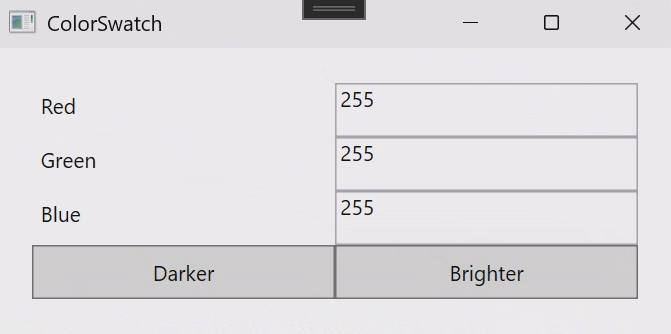
This application consists of a model class named `RgbColor` and a view-model class named `ColorViewModel`. The model class has a `Hex` property of type `string` computed from the individual color components.
```csharp
public partial class RgbColor
{
public RgbColor( int red, int green, int blue )
{
this.Red = red;
this.Green = green;
this.Blue = blue;
}
public int Red { get; set; }
public int Green { get; set; }
public int Blue { get; set; }
public string Hex => $"#{this.Red:x2}{this.Green:x2}{this.Blue:x2}";
public void IncreaseBrightness( int increment )
{
this.Red += increment;
this.Green += increment;
this.Blue += increment;
}
public RgbColor Grayscale => ColorHelper.RgbToGrayscale(this);
}
```
The `ColorViewModel` class has a `BackgroundBrush` property that depends on the `HexColor` property and is bound to the UI background color.
```csharp
public partial class ColorViewModel
{
public RgbColor RgbColor { get; set; } = new RgbColor( 255, 255, 255 );
public SolidColorBrush BackgroundBrush => ColorHelper.ConvertToBrush( this.RgbColor.Hex );
}
```
For the `RgbColor` class, the code handling `INotifyPropertyChanged` is quite straightforward. If we had to write the code by hand, we would probably end up with the following snippet:
```csharp
public partial class RgbColor : INotifyPropertyChanged
{
public RgbColor(int red, int green, int blue)
{
this.Red = red;
this.Green = green;
this.Blue = blue;
}
private int _red;
public int Red
{
get => this._red;
set
{
if (this._red != value)
{
this._red = value;
this.OnPropertyChanged("Hex");
this.OnPropertyChanged("Red");
}
}
}
// Idem for Green and Blue.
public string Hex => $"#{this.Red:x2}{this.Green:x2}{this.Blue:x2}";
protected virtual void OnPropertyChanged(string propertyName)
{
this.PropertyChanged?.Invoke(this, new PropertyChangedEventArgs(propertyName));
}
public event PropertyChangedEventHandler? PropertyChanged;
}
```
As you can see, simple automatic properties must be replaced by much longer implementations that call the `OnPropertyChanged` method. The setter of each `Red`, `Green`, and `Blue` property must notify a change both of the property itself and of the `Hex` computed property.
The code necessary to implement `INotifyPropertyChanged` in `ColorViewModel` is even longer because the `BackgroundBrush` property depends on a property _of a property_, namely `this.RgbColor.Hex`.
Our goal is to automate this code implementation. Let's see how we can do this using Metalama.
The full source code of examples in this article is available on [GitHub](https://github.com/postsharp/TimelessDotNetEngineer/tree/main/src/wpf/notifypropertychanged).
## Approach 1: Building our own aspect
For those who like to understand how things work instead of using black boxes, let's start with our own implementation.
Metalama allows you to automate repetitive tasks using _aspects_, special kinds of classes that run within the compiler or the IDE and can modify, on the fly, the code to which they are applied. You can think of aspects as special custom attributes that transform your source code during the build.
In this case, we will write an aspect named `NotifyPropertyChangedAttribute` that will implement the `INotifyPropertyChanged` interface for the target class and automatically raise the `PropertyChanged` event for each property that changes.
Here is the full code of it.
```csharp
namespace ColorSwatch
{
[Inheritable]
// The aspect will be applicable to types, so it will inherit from the provided TypeAspect class.
internal class NotifyPropertyChangedAttribute : TypeAspect
{
public override void BuildAspect(IAspectBuilder builder)
{
// Then, we use the ImplementInterface implement the INotifyPropertyChanged interface.
builder.Advice.ImplementInterface(builder.Target, typeof(INotifyPropertyChanged),
OverrideStrategy.Ignore);
// We also override the properties using the OverridePropertySetter template
// to ensure that all change notifications are properly triggered.
foreach (var property in builder.Target.Properties.Where(p =>
!p.IsAbstract && p.Writeability == Writeability.All))
{
builder.Advice.OverrideAccessors(property, null, nameof(this.OverridePropertySetter));
}
}
// Finally we add the PropertyChanged event of the INotifyPropertyChanged interface.
[InterfaceMember] public event PropertyChangedEventHandler? PropertyChanged;
[Introduce(WhenExists = OverrideStrategy.Ignore)]
protected void OnPropertyChanged(string name) =>
this.PropertyChanged?.Invoke(meta.This, new PropertyChangedEventArgs(name));
[Template]
private dynamic OverridePropertySetter(dynamic value)
{
if (value != meta.Target.Property.Value)
{
meta.Proceed();
this.OnPropertyChanged(meta.Target.Property.Name);
}
return value;
}
}
}
```
For a comprehensive breakdown of the above code, along with its limitations and potential drawbacks, check out [Implementing INotifyPropertyChanged without Boilerplate](https://doc.metalama.net/examples/notifypropertychanged) in Metalama's documentation.
We can now use the `[NotifyPropertyChanged]` aspect with our `ColorViewModel` class.
```csharp
[NotifyPropertyChanged]
public class ColorViewModel
{
// ...
}
```
You can take a look at what the generated code will look like using our [Metalama Diff tool](https://doc.metalama.net/conceptual/using/understanding-your-code-with-aspects#metalama-diff) (included in [Visual Studio Tools for Metalama](https://marketplace.visualstudio.com/items?itemName=PostSharpTechnologies.PostSharp)).
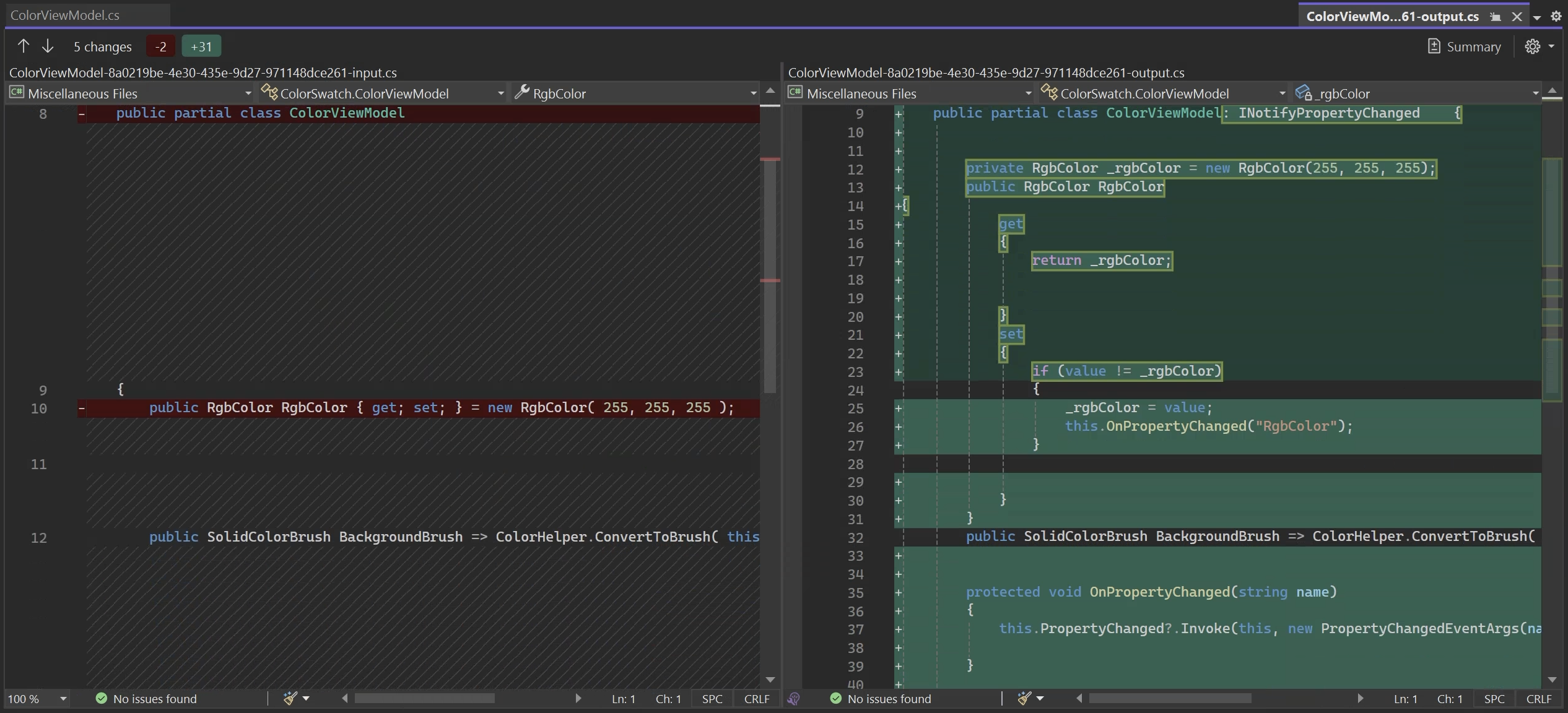
If you run the application with this aspect, you'll see that the _Brighter_ and _Darker_ buttons work and that the RGB values in the text boxes are correctly updated.
However, the background color is not updated. Why? Because our aspect does not have any logic to handle _dependent properties_. Specifically, it does not notify a change of `Hex` when `Red`, `Green`, or `Blue` is modified. Also, there's nothing to notify a change to the `ColorViewModel.BackgroundBrush` property when the `RgbColor.Hex` property it depends on is modified.
## Approach 2: Using Metalama.Patterns.Observable
As you can now imagine, you can totally use Metalama to automate the implementation of a pattern like `INotifyPropertyChanged`. However, going beyond the trivial case of automatic properties is not so simple. That's why our team built the `[Observable]` aspect from the open-source `Metalama.Patterns.Observable` package, which supports most imaginable scenarios.
The `[Observable]` aspect is one of the [many](https://www.postsharp.net/metalama/marketplace) open-source, production-ready aspects provided by Metalama. This particular pattern is a (much) more advanced and enhanced version of the `NotifyPropertyChangedAttribute` aspect that we developed here above.
This pattern is designed to automatically identify properties that rely on others and send out change notifications for them. This means you don't have to manually trigger the `PropertyChanged` event for these dependent properties, as the aspect takes care of that for you.
To use it in our example app, we just need to apply the `Observable` attribute to our `ColorViewModel` class (instead of the `NotifyPropertyChangedAttribute` attribute):
1. Add the `Metalama.Patterns.Observability` package to your project.
2. Add the `[Observable]` custom attribute to your class.
```csharp
using Metalama.Patterns.Observability;
[Observable]
public partial class ColorViewModel
{
// ...
}
```
The `[Observable]` aspect now analyzes your source code and automatically adds just what's needed to implement change notification in your objects.
### Supported Scenarios
The `Metalama.Patterns.Observability` package supports a variety of common scenarios that go beyond the usual automatic properties.
* **Automatic properties**
Starting with the obvious, the automatic property `Red` will be converted to a property with a backing field, and the `OnPropertyChanged` method will be called when the property is set. The same will happen with the `Green` and `Blue` properties.
```csharp
public int Red { get; set; }
```
* **Explicitly-implemented properties referencing other fields and properties**
In this scenario, the aspect will examine how the `Hex` property depends on other properties (such as `Red`, `Green`, and `Blue`) and will trigger the `PropertyChanged` event for `Hex` whenever any of these dependent properties are modified. The dependency to `Hex` is automatically detected, so you can clear that from the back of your head.
```csharp
public string Hex => $"#{this.Red:x2}{this.Green:x2}{this.Blue:x2}";
```
* **Child objects (properties of properties)**
When a property’s getter accesses the property of another object (a *child object* like `RgbColor`), the `[Observable]` aspect automatically creates a `SubscribeTo` method for that property. This method listens for the child object’s `PropertyChanged` event, ensuring that any changes in the child are detected and handled properly. Thus, the `BackgroundBrush` property will be updated whenever the `RgbColor.Hex` property changes. Please refer to the [documentation](https://doc.metalama.net/patterns/observability/standard-cases) to see the code generation pattern in action.
```csharp
public SolidColorBrush BackgroundBrush => ColorHelper.ConvertToBrush(this.RgbColor.Hex);
```
* **Derived types**
If you have a base class with the `[Observable]` attribute, any derived classes will automatically inherit the same behavior. This means you can extend the functionality of your classes without worrying about breaking the change notification system.
For instance, in the following snippet, the `HexWithAlpha` property depends on properties of the base type.
```csharp
public class TransparentRgbColor : RgbColor
{
public TransparentRgbColor(int red, int green, int blue, double alpha)
: base(red, green, blue) // Call the base class constructor
{
this.Alpha = alpha;
}
public double Alpha { get; set; }
public string HexWithAlpha => $"{Hex}{((byte)(Alpha * 255)):x2}";
}
```
The aspect will automatically override the `OnPropertyChanged` method if a method of the derived type depends on a property of the base type.
## Is Metalama's [Observable] really better?
Using Metalama's `[Observable]` aspect offers many benefits compared to implementing `INotifyPropertyChanged` by hand or using alternative code generation solutions:
### Boilerplate code elimination
Our experience shows that the vast majority of the repetitive code supporting `INotifyPropertyChanged` can be avoided thanks to the `[Observable]` aspect. The result: simpler, cleaner code that is easier to read, maintain, and debug.
While other solutions exist to generate the `INotifyPropertyChanged` boilerplate, they don't cover as many scenarios, so while you can avoid _some_ boilerplate, you still have some hand work to do.
### Safety from human errors
One of the key benefits of using the Observable aspect is its ability to prevent human errors. You no longer need to remember to manually raise notifications; the Observable aspect automatically handles property change notifications. This eliminates frustrating bugs where the UI fails to update or dependent logic doesn't respond to data changes.
The Observable aspect provides clear warnings when it encounters unsupported situations. These warnings help you identify potential issues in your code and offer suggestions on how to resolve or ignore them. By alerting you to potential problems, the Observable pattern helps you maintain the integrity of your codebase and avoid common pitfalls that could lead to bugs or inconsistencies.
For example, let's say we add a property to our `RgbColor` class to convert an `RgbColor` to a grayscale color.
```cs
public RgbColor Grayscale => ColorHelper.RgbToGrayscale(this);
```
And we add a static method to the `ColorHelper` class to convert a color to grayscale.
```csharp
public static RgbColor RgbToGrayscale(RgbColor color)
{
// Calculate the grayscale value using the luminance formula
var grayValue = (int)(color.Red * 0.299 + color.Green * 0.587 + color.Blue * 0.114);
// Ensure the grayscale value is clamped between 0 and 255
grayValue = Math.Clamp(grayValue, 0, 255);
return new RgbColor(grayValue, grayValue, grayValue); // Return the grayscale RGB
}
```
After compiling the code, .NET will issue a warning to inform you that the `RgbToGrayscale` method cannot be analyzed and provide clear suggestions on how to resolve the issue.

Here, Metalama complains because a method of a separate class is called, and this method has non-immutable arguments. This method may (and indeed does) reference some mutable properties of the parameter, but the Observable aspect does not know it. The right solution in our case is to refactor `RgbToGrayscale` to accept the color components as three separate but immutable values. It may seem complex, but without that warning, you would probably have a very hard-to-find bug in your code.
### Idiomatic source code
Some alternative technologies purely based on Roslyn generators (I'm looking at you, Microsoft's MVVM Community Toolkit) force you to write _fields_ by hand and generate properties. They take this approach because, unlike Metalama, they can only generate code _besides_ hand-written code rather than _into_ it. This approach works _against_ your code.
Metalama works _with_ your code. Your .NET code still looks like .NET code. This ensures that your code will be intuitive to other developers familiar with .NET.
## Summary
In this article, we've shown you how to use Metalama to implement the `INotifyPropertyChanged` interface with minimal manual effort. We've explored two approaches: building our own aspect and using the `[Observable]` aspect provided by Metalama. The `[Observable]` aspect is a more advanced and enhanced version of the `NotifyPropertyChanged` aspect, offering additional features such as automatic handling of dependent properties and child objects. By automating the implementation of `INotifyPropertyChanged`, Metalama helps reduce boilerplate code through code generation and prevent human errors through code analysis and warnings.
---
## Site navigation
- Index of the whole site: [llms.txt](../llms.txt)