[Home](../) › [Blog](../blog) › Hi-Res Logging in .NET Aspire Without Touching Business Code
# Hi-Res Logging in .NET Aspire Without Touching Business Code
> Trace method calls in a .NET Aspire distributed cloud-native app with minimal boilerplate, using the Metalama [Log] aspect and a fabric.
Published: 2024-12-18 · Author: Metalama Team · Canonical: https://postsharp.net/blog/aspire-logging-metalama
A .NET Aspire app gives you distributed tracing and metrics almost for free, except the log lines you still hand-write in every method. Here's how to delete them: add the Metalama `[Log]` aspect to every public method with one fabric, then read the result in the Aspire dashboard.
## Introduction
There's a saying that computers always do what you tell them to do, which isn't necessarily what you want them to do. When you find yourself in such a situation and it's not clear where the difference originates, you have two options:
- **Debugging** requires the app to be interrupted and it may not always be possible to attach to the failing instance or reproduce the behavior with another one.
- **Tracing** allows you to follow the execution of the app without interrupting it, providing a detailed log of what happened.
Here is how to trace _method calls_ in a .NET Aspire app without boilerplate code, using Metalama.
As we discussed in the article about [caching in .NET Aspire](https://postsharp.net/blog/aspire-caching-metalama), .NET Aspire is a development platform that simplifies building distributed cloud-native applications. It manages all the wiring between the various services of your application and other components like databases, messaging, and caching. Using Open Telemetry, it provides essential features for the [observability of your app](https://learn.microsoft.com/en-us/dotnet/aspire/fundamentals/telemetry), such as logging, tracing, and metrics.
## Step 1. Setting up the projects
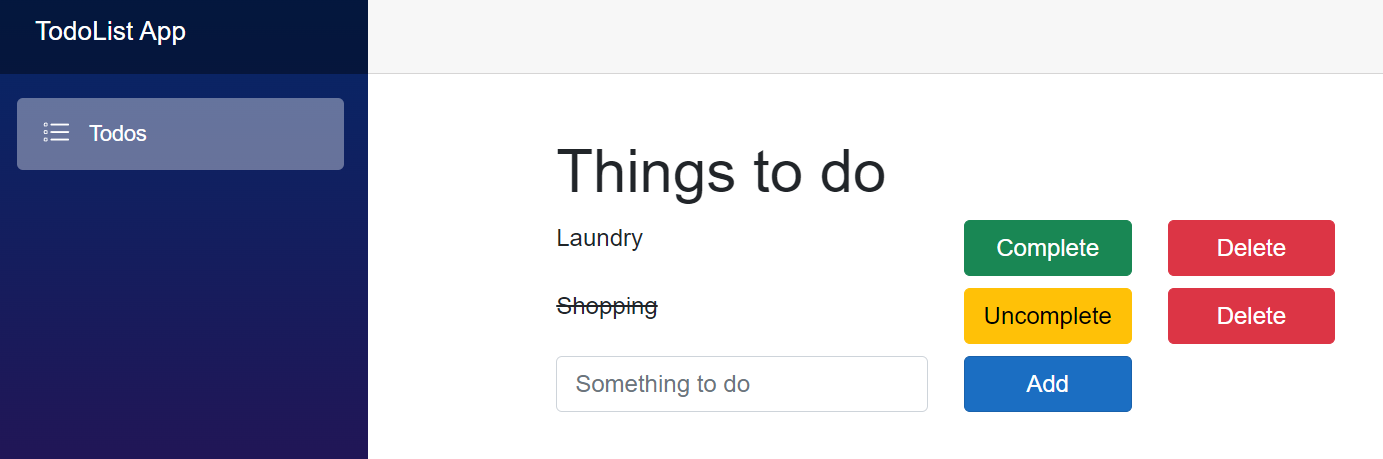
To show you how to trace method calls in a .NET Aspire app, we'll use a base example of a to-do list app. The app consists of an ASP.NET Core Minimal API backend and a Blazor front-end, orchestrated using .NET Aspire. The app is structured as a solution with multiple projects, each serving a different purpose.
The solution contains the following projects:
* The _app host_ project, containing the service orchestration. You can think of this project as the bootstrapper of other projects.
* The _web API_ project,
* The _web front-end_ project,
* The _service default_ project that contains shared service configuration,
* The _data_ project shared between the API and front-end projects,
* The _aspects_ project mentioned above implementing the `LogAttribute` and `LogAllPublicMethodsFabric`.
The _aspects_ project is then referenced in both the _web API_ and the _web front-end_ projects.
The full source code of examples in this article is available on [GitHub](https://github.com/postsharp/TimelessDotNetEngineer/tree/main/src/aspire/logging-metalama).
When you run the app, you should see this:
 ## Step 2. Creating a logging aspect
An _aspect_ is a special kind of class, usually a custom attribute, that executes within the compiler or the IDE and dynamically transforms your source code. There are several [aspect frameworks](https://www.postsharp.net/solutions/aspect-oriented-programming) for .NET. Here we'll use the most modern of them: [Metalama](https://www.postsharp.net/metalama).
We will use the [example logging aspect](https://doc.metalama.net/examples/log) of the reference documentation.
Here is the `[Log]` aspect in real code:
```csharp
public partial class TodoApiClient( HttpClient httpClient )
{
public async Task GetTodosAsync( CancellationToken cancellationToken = default )
=> await httpClient.GetFromJsonAsync( "/todo", cancellationToken );
}
```
Under the hood, the `[Log]` aspect:
- Pulls the [ILogger](https://learn.microsoft.com/en-us/dotnet/core/extensions/logging?tabs=command-line) service into your class,
- Logs the method entry, including the argument values,
- Logs the method exit, including the returned value and output parameter values,
- Logs the method failure, including the exception message.
The source code is transformed into this before it is compiled into assembly instructions:
```csharp
public partial class TodoApiClient
{
private readonly ILogger _logger;
private readonly HttpClient httpClient;
public TodoApiClient(HttpClient httpClient, ILogger )
{
this.httpClient = httpClient;
this._logger = logger;
}
public async Task GetTodosAsync( CancellationToken cancellationToken = default )
{
var isTracingEnabled = _logger.IsEnabled(LogLevel.Trace);
if (isTracingEnabled)
{
using (var guard = LoggingRecursionGuard.Begin())
{
if (guard.CanLog)
{
_logger.LogTrace($"TodoApiClient.GetTodosAsync({{cancellationToken}}) started.",
[cancellationToken]!);
}
}
}
try
{
var result = await this.GetTodosAsync_Source(cancellationToken);
if (isTracingEnabled)
{
using (var guard_1 = LoggingRecursionGuard.Begin())
{
if (guard_1.CanLog)
{
_logger.LogTrace($"TodoApiClient.GetTodosAsync({{cancellationToken}}) returned {{result}}.",
[cancellationToken, result]!);
}
}
}
return result;
}
catch (Exception e) when (_logger.IsEnabled(LogLevel.Warning))
{
using (var guard_2 = LoggingRecursionGuard.Begin())
{
if (guard_2.CanLog)
{
_logger.LogWarning($"TodoApiClient.GetTodosAsync({{cancellationToken}}) failed: {e.Message}",
[cancellationToken]!);
}
}
throw;
}
}
}
```
This code is arguably very verbose, but you don't have to write it by hand! To make it more compact, you could use some [string interpolation techniques](https://postsharp.net/blog/structured-logging-with-string-interpolation).
## Step 3. Adding logging to all public methods
In the previous step, we've shown how to add logging without _almost_ any change in the source code. However, you still had to add a custom attribute to every single method. This is still quite cumbersome!
It would be handy to have some sort of SQL that would allow me to "select" all the public methods and then iterate over the result to apply the [Log] aspect... no? This is where [the fabrics](https://doc.metalama.net/conceptual/using/fabrics) come in.
In a nutshell, a fabric is a feature of Metalama that allows you to apply aspects in bulk. In the next example, we're going to use the [transitive project fabric](https://doc.metalama.net/api/metalama-framework-fabrics-transitiveprojectfabric). A transitive fabric is a build-time entry point that is executed when any project _referencing_ the project containing that fabric is built. The same works, of course, at design time.
Here is the code of the fabric:
```csharp
internal class LogAllPublicMethodsFabric : TransitiveProjectFabric
{
public override void AmendProject( IProjectAmender amender )
=> amender
.SelectTypes()
.Where( type => type.Accessibility == Accessibility.Public )
.SelectMany( type => type.Methods )
.Where( method => method.Accessibility == Accessibility.Public && method.Name != "ToString" )
.AddAspectIfEligible();
}
```
The previous code snippet shows a fabric that adds the `LogAttribute` aspect (that's the name of the class that implements the `[Log]` aspect) to all public methods (except `ToString`). Since we're adding the transitive fabric to the `TodoList.Aspects` project, all projects referencing `TodoList.Aspects` now have logging on their public methods.
This approach works for classes that are instantiated by the [.NET dependency injection](https://learn.microsoft.com/en-us/dotnet/core/extensions/dependency-injection) container because it relies on the [ILogger](https://learn.microsoft.com/en-us/dotnet/core/extensions/logging) service. You will have to pass this dependency manually to classes that are instantiated manually, without the DI container.
The fabric can be tuned for a different set of methods: all information about all methods is available, so your filter can be as fine-grained as you need.
## Step 4. Analyzing the logs
.NET Aspire comes with a handy dashboard that includes a tab showing structured logs. There, you can see all the logs of all the services of your application. To check that our method calls are being logged (and the fabric and aspect work), we've added some tasks to the to-do list app and marked one of them as completed.
Back to the .NET Aspire dashboard, on the "Structured" tab, the log records can be filtered according to any parameter, including a trace ID, so you can view individual requests. The next screenshot shows all the filtered log records coming from our `TodoService` class of the API service:
## Step 2. Creating a logging aspect
An _aspect_ is a special kind of class, usually a custom attribute, that executes within the compiler or the IDE and dynamically transforms your source code. There are several [aspect frameworks](https://www.postsharp.net/solutions/aspect-oriented-programming) for .NET. Here we'll use the most modern of them: [Metalama](https://www.postsharp.net/metalama).
We will use the [example logging aspect](https://doc.metalama.net/examples/log) of the reference documentation.
Here is the `[Log]` aspect in real code:
```csharp
public partial class TodoApiClient( HttpClient httpClient )
{
public async Task GetTodosAsync( CancellationToken cancellationToken = default )
=> await httpClient.GetFromJsonAsync( "/todo", cancellationToken );
}
```
Under the hood, the `[Log]` aspect:
- Pulls the [ILogger](https://learn.microsoft.com/en-us/dotnet/core/extensions/logging?tabs=command-line) service into your class,
- Logs the method entry, including the argument values,
- Logs the method exit, including the returned value and output parameter values,
- Logs the method failure, including the exception message.
The source code is transformed into this before it is compiled into assembly instructions:
```csharp
public partial class TodoApiClient
{
private readonly ILogger _logger;
private readonly HttpClient httpClient;
public TodoApiClient(HttpClient httpClient, ILogger )
{
this.httpClient = httpClient;
this._logger = logger;
}
public async Task GetTodosAsync( CancellationToken cancellationToken = default )
{
var isTracingEnabled = _logger.IsEnabled(LogLevel.Trace);
if (isTracingEnabled)
{
using (var guard = LoggingRecursionGuard.Begin())
{
if (guard.CanLog)
{
_logger.LogTrace($"TodoApiClient.GetTodosAsync({{cancellationToken}}) started.",
[cancellationToken]!);
}
}
}
try
{
var result = await this.GetTodosAsync_Source(cancellationToken);
if (isTracingEnabled)
{
using (var guard_1 = LoggingRecursionGuard.Begin())
{
if (guard_1.CanLog)
{
_logger.LogTrace($"TodoApiClient.GetTodosAsync({{cancellationToken}}) returned {{result}}.",
[cancellationToken, result]!);
}
}
}
return result;
}
catch (Exception e) when (_logger.IsEnabled(LogLevel.Warning))
{
using (var guard_2 = LoggingRecursionGuard.Begin())
{
if (guard_2.CanLog)
{
_logger.LogWarning($"TodoApiClient.GetTodosAsync({{cancellationToken}}) failed: {e.Message}",
[cancellationToken]!);
}
}
throw;
}
}
}
```
This code is arguably very verbose, but you don't have to write it by hand! To make it more compact, you could use some [string interpolation techniques](https://postsharp.net/blog/structured-logging-with-string-interpolation).
## Step 3. Adding logging to all public methods
In the previous step, we've shown how to add logging without _almost_ any change in the source code. However, you still had to add a custom attribute to every single method. This is still quite cumbersome!
It would be handy to have some sort of SQL that would allow me to "select" all the public methods and then iterate over the result to apply the [Log] aspect... no? This is where [the fabrics](https://doc.metalama.net/conceptual/using/fabrics) come in.
In a nutshell, a fabric is a feature of Metalama that allows you to apply aspects in bulk. In the next example, we're going to use the [transitive project fabric](https://doc.metalama.net/api/metalama-framework-fabrics-transitiveprojectfabric). A transitive fabric is a build-time entry point that is executed when any project _referencing_ the project containing that fabric is built. The same works, of course, at design time.
Here is the code of the fabric:
```csharp
internal class LogAllPublicMethodsFabric : TransitiveProjectFabric
{
public override void AmendProject( IProjectAmender amender )
=> amender
.SelectTypes()
.Where( type => type.Accessibility == Accessibility.Public )
.SelectMany( type => type.Methods )
.Where( method => method.Accessibility == Accessibility.Public && method.Name != "ToString" )
.AddAspectIfEligible();
}
```
The previous code snippet shows a fabric that adds the `LogAttribute` aspect (that's the name of the class that implements the `[Log]` aspect) to all public methods (except `ToString`). Since we're adding the transitive fabric to the `TodoList.Aspects` project, all projects referencing `TodoList.Aspects` now have logging on their public methods.
This approach works for classes that are instantiated by the [.NET dependency injection](https://learn.microsoft.com/en-us/dotnet/core/extensions/dependency-injection) container because it relies on the [ILogger](https://learn.microsoft.com/en-us/dotnet/core/extensions/logging) service. You will have to pass this dependency manually to classes that are instantiated manually, without the DI container.
The fabric can be tuned for a different set of methods: all information about all methods is available, so your filter can be as fine-grained as you need.
## Step 4. Analyzing the logs
.NET Aspire comes with a handy dashboard that includes a tab showing structured logs. There, you can see all the logs of all the services of your application. To check that our method calls are being logged (and the fabric and aspect work), we've added some tasks to the to-do list app and marked one of them as completed.
Back to the .NET Aspire dashboard, on the "Structured" tab, the log records can be filtered according to any parameter, including a trace ID, so you can view individual requests. The next screenshot shows all the filtered log records coming from our `TodoService` class of the API service:
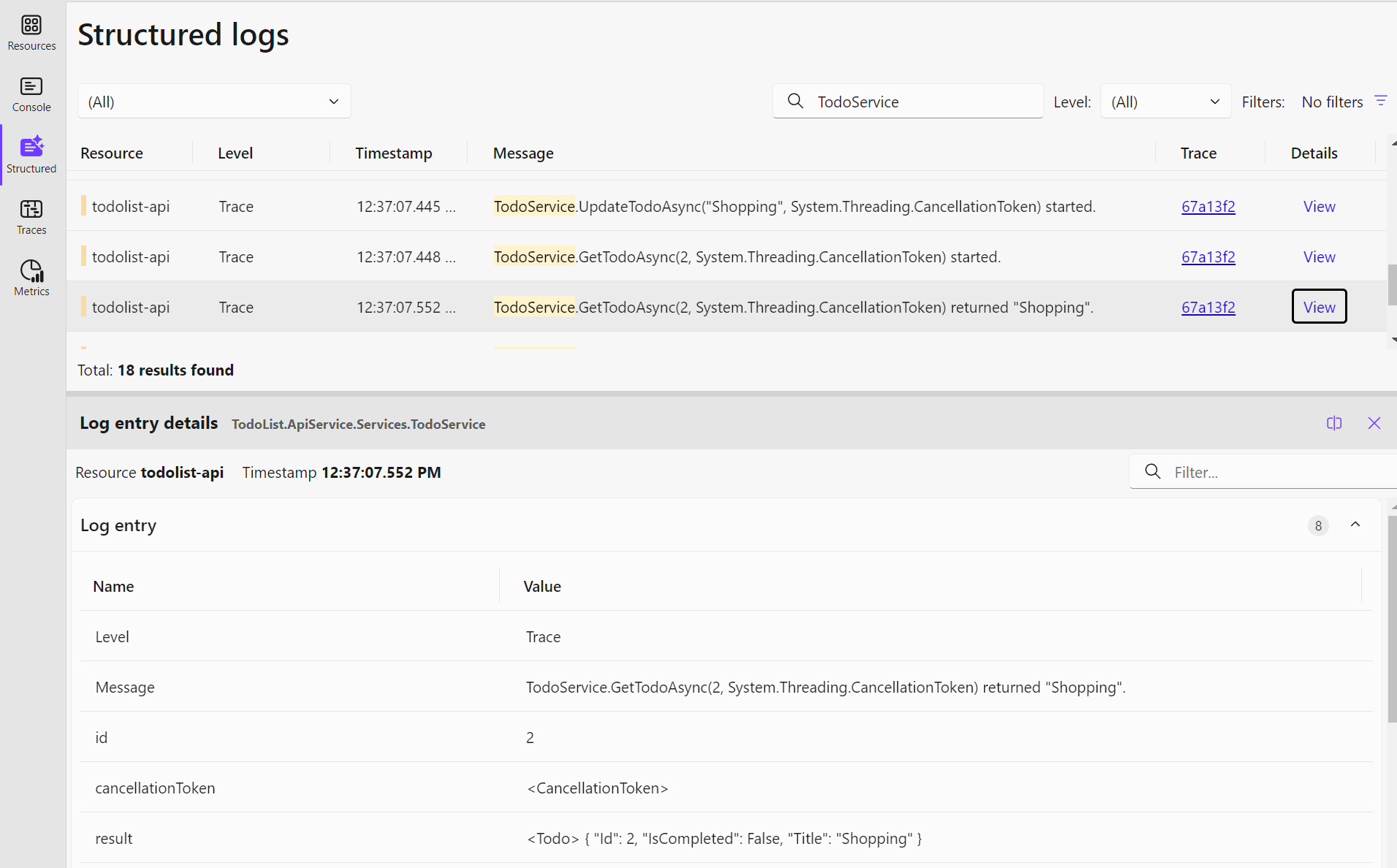 The values shown on the dashboard can be further improved using a [custom log record processor](https://github.com/open-telemetry/opentelemetry-dotnet/blob/main/docs/logs/extending-the-sdk/README.md#processor), as we did in our sample, or by wiring up a logging framework with better support for structured logging of .NET objects like [Serilog](https://serilog.net/).
## Summary
In this article, we've shown how to trace method calls in a .NET Aspire app without boilerplate code using Metalama. We've used a base example of a to-do list app with an ASP.NET Core Minimal API backend and a Blazor front-end, orchestrated using .NET Aspire. We've demonstrated how to log all public methods of the app using the `[Log]` aspect using a special kind of class called a fabric. We've also shown how to analyze the logs using the .NET Aspire dashboard.
---
## Site navigation
- Index of the whole site: [llms.txt](../llms.txt)
The values shown on the dashboard can be further improved using a [custom log record processor](https://github.com/open-telemetry/opentelemetry-dotnet/blob/main/docs/logs/extending-the-sdk/README.md#processor), as we did in our sample, or by wiring up a logging framework with better support for structured logging of .NET objects like [Serilog](https://serilog.net/).
## Summary
In this article, we've shown how to trace method calls in a .NET Aspire app without boilerplate code using Metalama. We've used a base example of a to-do list app with an ASP.NET Core Minimal API backend and a Blazor front-end, orchestrated using .NET Aspire. We've demonstrated how to log all public methods of the app using the `[Log]` aspect using a special kind of class called a fabric. We've also shown how to analyze the logs using the .NET Aspire dashboard.
---
## Site navigation
- Index of the whole site: [llms.txt](../llms.txt)