The most basic feature of PostSharp is adding code at the beginning and end of target methods. Of course, this is not all that PostSharp is doing, but it is a powerful and widely applicable feature.
And, as of PostSharp 6.6, it is available for free in our PostSharp Essentials edition. There is no longer any restriction on the number of types that can be enhanced with it.
We call this feature the method boundary aspect. It is also known as a method decorator in other frameworks.
Here’s how you can add the method boundary aspect to your code:
After you do this, then each time the annotated method is executed, the code in your OnExit method will be executed right afterwards.
I’ll use a couple of examples from my own projects to show how this can be useful.
Suppose you’re creating a video game and some data, such as the player’s number of experience points or the achievements they have unlocked, should persist after the game closes.
You don’t generally want to save at the moment the game closes: you won’t have the opportunity if it crashes and you’re generally not supposed to block an Alt+F4 event, which many players use to quit a game. So a good approach is to save immediately after the persistent data changes.
With PostSharp, you could do it like this:
class PlayerInformation
{
    public int ExperiencePoints { get; [ThenSave] set; }
    public List Achievements { get; }

    [ThenSave]
    public void AddAchievement(Achievement achievement)
    {
        ...
    }
}
Where the [ThenSave] aspect means “When this method completes, save this information to disk.”
The code for the [ThenSave] class is this:
[Serializable]
internal class ThenSaveAttribute : OnMethodBoundaryAspect
{
    public override void OnExit(MethodExecutionArgs args)
    {
        XmlSave.Save((PlayerInformation)args.Instance); // serializes and saves to disk
    }
}
The parameter MethodExecutionArgs contains some information about how and where the method was called. In this case, we’re only interested in the instance of PlayerInformation, and we don’t plan to use [ThenSave] on any other class, so we can hard cast args.Instance to PlayerInformation here.
Notice I could also add the aspect to the method setter. PostSharp also allows you to do location interception aspects, which act on properties themselves, but those aren’t in the Community edition. But, a setter is technically just a method so you can apply the free method boundary aspect to it! Loophole ^^!
In some lazy initialization patterns, you don’t want to initialize an instance in its constructor, but you can’t allow public methods to execute until initialization has taken place. This leads to code such as this:
    class AccountRepository
    {
        public bool Exists(string accountNumber)
        {
            InitializeIfNeeded();
            return ...;
        }
        public Account FetchAccount(string accountNumber)
        {
            InitializeIfNeeded();
            return ...;
        }
    }
You could replace the calls to InitializeIfNeeded() with a method boundary aspect that executed that code before the actual method body, but then you’re just using an attribute instead of a line of code and you’re not getting much benefit.
But, you could also use multicasting and add the attribute to the class AccountRepository itself. In PostSharp, adding a method boundary aspect to a class means “add this aspect to all methods in this class”, so your code would look like this:
        [InitializeIfNeeded(
            AttributeTargetMembers = MulticastTargets.Method, // don’t apply to constructor
            AttributeTargetMemberAttributes = MulticastAttributes.Public // no private
        )]
        class AccountRepository
        {
            public bool Exists(string accountNumber)
            {
                return ...;
            }
            public Account FetchAccount(string accountNumber)
            {
                return ...;
            }
        }
As a bonus, you eliminate the bugs that could occur if you added a new public method and forgot to add the initialization code to it.
I have seen the “log and swallow exception” pattern in several projects now:
    try
    {
        UnreliableCode();
    }
    catch (Exception e)
    {
        Log(e);
    }
It is useful both if you’re the consumer of UnreliableCode and you need to protect your application from it, or if you’re the author of UnreliableCode and need to shield your consumer from possible errors in your code.
To avoid writing this code, possibly in many places, you could annotate the UnreliableCode method with a method boundary aspect where you override the OnException method. You can then decide what code executes in the catch block and whether the exception should be swallowed or rethrown by the aspect.
This is how the aspect could look like:
[Serializable]
internal class LogAndSwallowAttribute : OnMethodBoundaryAspect
{
    public override void OnException(MethodExecutionArgs args)
    {
        Log.WriteLine(args.Exception.ToString()); // log
        args.FlowBehavior = FlowBehavior.Continue; // swallow
    }
}
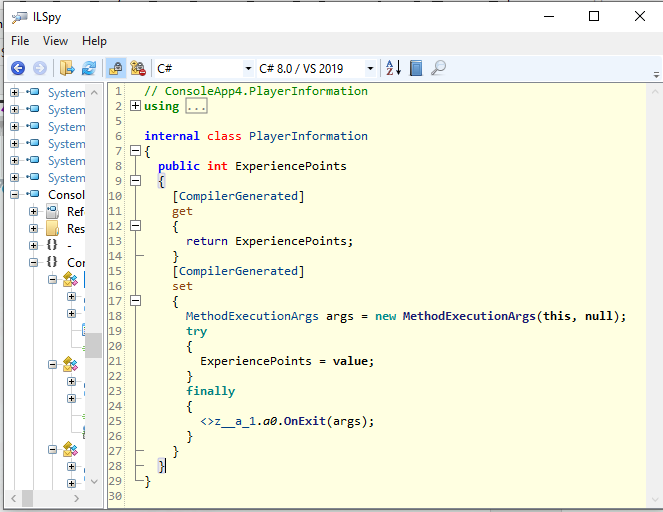
Let’s look at the class PlayerInformation from our first example under a decompiler and see what’s actually in the resulting assembly!
The getter is unchanged but the setter is restructured: the actual method body (ExperiencePoints = value;) is wrapped in a try/finally construct and our aspect code is executed in the finally block.
That’s because we used an OnExit override which happens regardless of whether the target method throws an exception. If we used OnSuccess instead, there would be no try/finally and the call to our aspect would happen immediately after the method body.
Then there’s the symbol <>z__a_1.a0. That’s a static field, synthesized by PostSharp, that holds the instance of the ThenSave aspect for the PlayerInformation class. It’s shared among all instances of that class, which is why you need to get the instance from the MethodExecutionArgs and you don’t have it available as a field.
Method boundary aspect is the most basic feature of PostSharp Essentials, but also possibly the most widely useful.
You can get started with PostSharp Essentials here or, for more details about the method boundary aspect, you can look at our more in-depth blog post. It’s older but still relevant.
--- ## Site navigation - Index of the whole site: [llms.txt](../llms.txt)