During debugging and prototyping, we often rely on the ToString method to know what an object looks like. This works well for built-in types like integer and string but becomes less helpful for classes and structs unless we override the ToString method manually. Unfortunately, this requires a lot of boilerplate. In this article, I introduce PostSharp.Community.ToString, a free and open-source extension to PostSharp that automatically generates the ToString method for you.
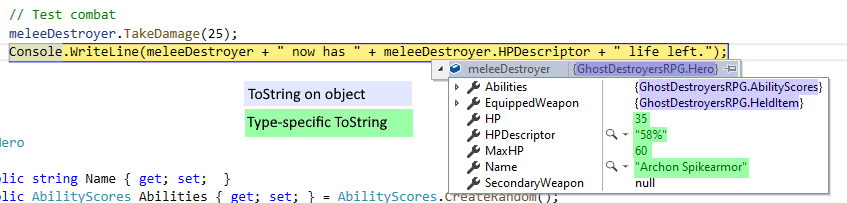
Here’s what a debugger view of an object in Visual Studio might look like when you don’t override ToString:
The values you see for strings and integers are valuable but the default ToString implementation on custom types is not as valuable. In this case, perhaps the only useful information it provides is that the variable or property isn’t null. To learn more, I would need to expand.
I could implement an override for ToString for each of these classes (Hero, AbilityScores, and HeldItem) by hand but that would mean writing and maintaining that code.
Enter PostSharp.Community.ToString, our new free and open-source PostSharp add-in that adds a better default ToString implementation.
If I add the attribute [ToString] to a class, PostSharp will synthesize a reasonable ToString method based on the class’s fields and properties for me.
As with the other add-ins we presented in this series of blog posts, we owe the idea as well as a significant portion of the implementation to Fody, this time to the add-in ToString.Fody.
You apply the attribute [ToString] to a class, like this:
[ToString]
class TestClass
{
    public int Foo { get; set; }
    public double bar;

    [IgnoreDuringToString]
    public string Baz { get; set; }
}
And during compilation, PostSharp synthesizes a ToString method for that class so the end result will be the same as if your code was actually this:
class TestClass
{
    public int Foo { get; set; }
    public double bar;
    public string Baz { get; set; }

    public override string ToString()
    {
        return $"TestClass; Foo:{Foo},bar:{bar}";
    }
}
All of your fields and properties, as well as the type name, are displayed in the string. You can exclude the type name or individual fields and properties, and you can set the separators (“,” and “:”) by setting properties on the attribute. The GitHub readme file has details.
This already has some advantages, especially for prototyping and debugging, over writing the ToString method yourself:
But there’s an even greater benefit that comes with multicasting.
PostSharp attributes are what we call “multicast attributes”: If you attach a multicast attribute to an assembly, it is the same as if you attached it to all the classes in that assembly. So I can type in this:
[assembly: ToString(PropertiesSeparator =", ", PropertyNameToValueSeparator = ": ", WriteTypeName = false)]
And now all classes in the assembly have a new and improved ToString implementation. (At least, all classes where I didn’t override ToString manually: a “real” ToString method still takes precedence over a PostSharp-created one.)
Our multicast attributes also have filters you can use to target a subset of classes.
And so, by adding this one line, now my debugger view looks like this:
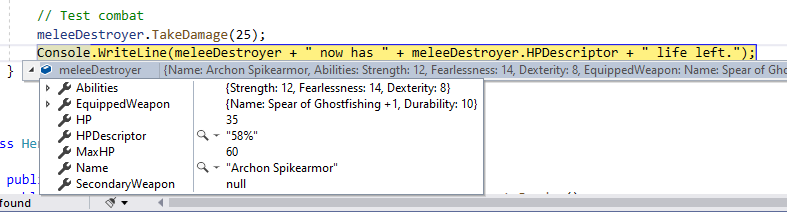
And that is way more informative.
I find this synthesized ToString method also valuable for rapid application development. When I’m prototyping or creating a quick-and-dirty user interface, I can have many objects that are eventually displayed to the user by being ToString’d. In situations where I don’t care about the exact presentation of a class, a [ToString] attribute will say everything there is to say about an object and can be appropriate.
Adding [ToString] to your solution saves you some time and code during debugging and for rapid prototyping. It also allows you to set a different “default” for your ToString methods, which you can target to namespaces, assemblies or even the whole solution using multicasting.
For more information on PostSharp.Community.ToString, see the GitHub readme file.
--- ## Site navigation - Index of the whole site: [llms.txt](../llms.txt)